> ## Documentation Index
> Fetch the complete documentation index at: https://docs.stackone.com/llms.txt
> Use this file to discover all available pages before exploring further.

# Connect Brainier with OAuth 2.0 (Elan/LMS REST API) – StackOne Hub

> Link a Brainier account in the StackOne Hub using OAuth 2.0 (Elan/LMS REST API). End-user guide to authorize the integration and start using Brainier actions.

<Warning>Admin privileges in your Brainier account are required to complete this integration. If you don't have admin access, please contact your Brainier administrator.</Warning>

<Panel>
  <div className="not-prose guides-scope-selector" data-guides-scope-selector data-guide-actions-json="[{&#x22;id&#x22;:&#x22;brainier_get_multiple_users_info&#x22;,&#x22;label&#x22;:&#x22;Get Multiple Users Info&#x22;,&#x22;scopes&#x22;:[&#x22;Users&#x22;]},{&#x22;id&#x22;:&#x22;brainier_get_single_user_info&#x22;,&#x22;label&#x22;:&#x22;Get Single User Info&#x22;,&#x22;scopes&#x22;:[&#x22;Users&#x22;]},{&#x22;id&#x22;:&#x22;brainier_update_user_info&#x22;,&#x22;label&#x22;:&#x22;Update User Info&#x22;,&#x22;scopes&#x22;:[&#x22;Users&#x22;]},{&#x22;id&#x22;:&#x22;brainier_create_user&#x22;,&#x22;label&#x22;:&#x22;Create User&#x22;,&#x22;scopes&#x22;:[&#x22;Users&#x22;]},{&#x22;id&#x22;:&#x22;brainier_upload_user_avatar&#x22;,&#x22;label&#x22;:&#x22;Upload User Avatar&#x22;,&#x22;scopes&#x22;:[&#x22;Users&#x22;]},{&#x22;id&#x22;:&#x22;brainier_get_multiple_groups_info&#x22;,&#x22;label&#x22;:&#x22;Get Multiple Groups Info&#x22;,&#x22;scopes&#x22;:[&#x22;Groups&#x22;]},{&#x22;id&#x22;:&#x22;brainier_get_single_group_info&#x22;,&#x22;label&#x22;:&#x22;Get Single Group Info&#x22;,&#x22;scopes&#x22;:[&#x22;Groups&#x22;]},{&#x22;id&#x22;:&#x22;brainier_add_user_to_group&#x22;,&#x22;label&#x22;:&#x22;Add User To Group&#x22;,&#x22;scopes&#x22;:[&#x22;Groups&#x22;]},{&#x22;id&#x22;:&#x22;brainier_update_group_info&#x22;,&#x22;label&#x22;:&#x22;Update Group Info&#x22;,&#x22;scopes&#x22;:[&#x22;Groups&#x22;]},{&#x22;id&#x22;:&#x22;brainier_create_group&#x22;,&#x22;label&#x22;:&#x22;Create Group&#x22;,&#x22;scopes&#x22;:[&#x22;Groups&#x22;]},{&#x22;id&#x22;:&#x22;brainier_remove_user_from_group&#x22;,&#x22;label&#x22;:&#x22;Remove User From Group&#x22;,&#x22;scopes&#x22;:[&#x22;Groups&#x22;]},{&#x22;id&#x22;:&#x22;brainier_get_multiple_roles_info&#x22;,&#x22;label&#x22;:&#x22;Get Multiple Roles Info&#x22;,&#x22;scopes&#x22;:[&#x22;Roles&#x22;]},{&#x22;id&#x22;:&#x22;brainier_get_single_role_info&#x22;,&#x22;label&#x22;:&#x22;Get Single Role Info&#x22;,&#x22;scopes&#x22;:[&#x22;Roles&#x22;]},{&#x22;id&#x22;:&#x22;brainier_get_multiple_learning_objects_info&#x22;,&#x22;label&#x22;:&#x22;Get Multiple Learning Objects Info&#x22;,&#x22;scopes&#x22;:[&#x22;LearningObjects&#x22;]},{&#x22;id&#x22;:&#x22;brainier_get_learning_object_info&#x22;,&#x22;label&#x22;:&#x22;Get Learning Object Info&#x22;,&#x22;scopes&#x22;:[&#x22;LearningObjects&#x22;]},{&#x22;id&#x22;:&#x22;brainier_get_learning_object_comments&#x22;,&#x22;label&#x22;:&#x22;Get Learning Object Comments&#x22;,&#x22;scopes&#x22;:[&#x22;LearningObjects&#x22;]},{&#x22;id&#x22;:&#x22;brainier_get_object_access&#x22;,&#x22;label&#x22;:&#x22;Get Object Access&#x22;,&#x22;scopes&#x22;:[&#x22;LearningObjects&#x22;]},{&#x22;id&#x22;:&#x22;brainier_create_object_access&#x22;,&#x22;label&#x22;:&#x22;Create Object Access&#x22;,&#x22;scopes&#x22;:[&#x22;LearningObjects&#x22;]},{&#x22;id&#x22;:&#x22;brainier_remove_object_access&#x22;,&#x22;label&#x22;:&#x22;Remove Object Access&#x22;,&#x22;scopes&#x22;:[&#x22;LearningObjects&#x22;]},{&#x22;id&#x22;:&#x22;brainier_get_class_schedules_info&#x22;,&#x22;label&#x22;:&#x22;Get Class Schedules Info&#x22;,&#x22;scopes&#x22;:[&#x22;LearningObjects&#x22;]},{&#x22;id&#x22;:&#x22;brainier_get_user_object_records&#x22;,&#x22;label&#x22;:&#x22;Get User Object Records&#x22;,&#x22;scopes&#x22;:[&#x22;UserObjectRecords&#x22;]},{&#x22;id&#x22;:&#x22;brainier_create_user_object_record&#x22;,&#x22;label&#x22;:&#x22;Create User Object Record&#x22;,&#x22;scopes&#x22;:[&#x22;UserObjectRecords&#x22;]},{&#x22;id&#x22;:&#x22;brainier_update_user_object_record&#x22;,&#x22;label&#x22;:&#x22;Update User Object Record&#x22;,&#x22;scopes&#x22;:[&#x22;UserObjectRecords&#x22;]},{&#x22;id&#x22;:&#x22;brainier_unregister_from_class&#x22;,&#x22;label&#x22;:&#x22;Unregister From Class&#x22;,&#x22;scopes&#x22;:[&#x22;UserObjectRecords&#x22;]},{&#x22;id&#x22;:&#x22;brainier_get_form_questions_and_answers&#x22;,&#x22;label&#x22;:&#x22;Get Form Questions And Answers&#x22;,&#x22;scopes&#x22;:[&#x22;Forms&#x22;]},{&#x22;id&#x22;:&#x22;brainier_get_form_options&#x22;,&#x22;label&#x22;:&#x22;Get Form Options&#x22;,&#x22;scopes&#x22;:[&#x22;Forms&#x22;]},{&#x22;id&#x22;:&#x22;brainier_get_user_form_answers&#x22;,&#x22;label&#x22;:&#x22;Get User Form Answers&#x22;,&#x22;scopes&#x22;:[&#x22;Forms&#x22;]},{&#x22;id&#x22;:&#x22;brainier_send_form_answers&#x22;,&#x22;label&#x22;:&#x22;Send Form Answers&#x22;,&#x22;scopes&#x22;:[&#x22;Forms&#x22;]},{&#x22;id&#x22;:&#x22;brainier_list_assignments&#x22;,&#x22;label&#x22;:&#x22;Get Assignments&#x22;,&#x22;scopes&#x22;:[&#x22;Assignments&#x22;]},{&#x22;id&#x22;:&#x22;brainier_create_assignment&#x22;,&#x22;label&#x22;:&#x22;Create Assignment&#x22;,&#x22;scopes&#x22;:[&#x22;Assignments&#x22;]},{&#x22;id&#x22;:&#x22;brainier_get_assigned_users&#x22;,&#x22;label&#x22;:&#x22;Get Assigned Users&#x22;,&#x22;scopes&#x22;:[&#x22;Assignments&#x22;]},{&#x22;id&#x22;:&#x22;brainier_create_assigned_user&#x22;,&#x22;label&#x22;:&#x22;Create Assigned User&#x22;,&#x22;scopes&#x22;:[&#x22;Assignments&#x22;]},{&#x22;id&#x22;:&#x22;brainier_remove_assigned_user&#x22;,&#x22;label&#x22;:&#x22;Remove Assigned User&#x22;,&#x22;scopes&#x22;:[&#x22;Assignments&#x22;]},{&#x22;id&#x22;:&#x22;brainier_get_assigned_groups&#x22;,&#x22;label&#x22;:&#x22;Get Assigned Groups&#x22;,&#x22;scopes&#x22;:[&#x22;Assignments&#x22;]},{&#x22;id&#x22;:&#x22;brainier_create_assigned_group&#x22;,&#x22;label&#x22;:&#x22;Create Assigned Group&#x22;,&#x22;scopes&#x22;:[&#x22;Assignments&#x22;]},{&#x22;id&#x22;:&#x22;brainier_remove_assigned_group&#x22;,&#x22;label&#x22;:&#x22;Remove Assigned Group&#x22;,&#x22;scopes&#x22;:[&#x22;Assignments&#x22;]},{&#x22;id&#x22;:&#x22;brainier_get_assigned_objects&#x22;,&#x22;label&#x22;:&#x22;Get Assigned Objects&#x22;,&#x22;scopes&#x22;:[&#x22;Assignments&#x22;]},{&#x22;id&#x22;:&#x22;brainier_create_assigned_object&#x22;,&#x22;label&#x22;:&#x22;Create Assigned Object&#x22;,&#x22;scopes&#x22;:[&#x22;Assignments&#x22;]},{&#x22;id&#x22;:&#x22;brainier_remove_assigned_object&#x22;,&#x22;label&#x22;:&#x22;Remove Assigned Object&#x22;,&#x22;scopes&#x22;:[&#x22;Assignments&#x22;]},{&#x22;id&#x22;:&#x22;brainier_get_assignments_by_user&#x22;,&#x22;label&#x22;:&#x22;Get Assignments By User&#x22;,&#x22;scopes&#x22;:[&#x22;Assignments&#x22;]},{&#x22;id&#x22;:&#x22;brainier_get_tags&#x22;,&#x22;label&#x22;:&#x22;Get Tags&#x22;,&#x22;scopes&#x22;:[&#x22;Tags&#x22;]},{&#x22;id&#x22;:&#x22;brainier_get_bookmarked_objects&#x22;,&#x22;label&#x22;:&#x22;Get Bookmarked Objects&#x22;,&#x22;scopes&#x22;:[&#x22;Bookmarks&#x22;]},{&#x22;id&#x22;:&#x22;brainier_create_bookmark&#x22;,&#x22;label&#x22;:&#x22;Create Bookmark&#x22;,&#x22;scopes&#x22;:[&#x22;Bookmarks&#x22;]},{&#x22;id&#x22;:&#x22;brainier_remove_bookmark&#x22;,&#x22;label&#x22;:&#x22;Remove Bookmark&#x22;,&#x22;scopes&#x22;:[&#x22;Bookmarks&#x22;]},{&#x22;id&#x22;:&#x22;brainier_get_object_authors&#x22;,&#x22;label&#x22;:&#x22;Get Object Authors&#x22;,&#x22;scopes&#x22;:[&#x22;Authors&#x22;]},{&#x22;id&#x22;:&#x22;brainier_get_all_object_authors&#x22;,&#x22;label&#x22;:&#x22;Get All Object Authors&#x22;,&#x22;scopes&#x22;:[&#x22;Authors&#x22;]},{&#x22;id&#x22;:&#x22;brainier_get_objects_by_author&#x22;,&#x22;label&#x22;:&#x22;Get Objects By Author&#x22;,&#x22;scopes&#x22;:[&#x22;Authors&#x22;]}]">
    <div className="guides-scope-selector__title">Select Actions to adjust the guide</div>
    <div className="guides-scope-selector__muted guides-scope-selector__subtitle">Some actions may require additional configuration in the provider to be accessible. Choose the actions you need and the guide will be updated.</div>

    <div className="guides-scope-selector__toolbar">
      <input type="text" placeholder="Search actions..." className="guides-scope-selector__input guides-scope-selector__search" data-guide-action-search />

      <button type="button" className="guides-scope-selector__quick-btn" data-guide-select-all>Select all</button>
      <button type="button" className="guides-scope-selector__quick-btn" data-guide-clear>Clear</button>
    </div>

    <div className="guides-scope-selector__list">
      <div className="guides-scope-selector__list-header">
        <div className="guides-scope-selector__list-header-spacer" />

        <div className="guides-scope-selector__list-header-action">Action</div>
        <div className="guides-scope-selector__list-header-scopes">Scope(s)</div>
      </div>

      <div className="guides-scope-selector__muted guides-scope-selector__status" data-guide-loading>Loading actions...</div>
      <div className="guides-scope-selector__muted guides-scope-selector__status" data-guide-no-results hidden>No actions match your search.</div>
    </div>

    <div className="guides-scope-selector__url-section">
      <div className="guides-scope-selector__muted guides-scope-selector__label">Dynamic Guide URL</div>

      <div className="guides-scope-selector__url-row">
        <input type="text" readOnly className="guides-scope-selector__input guides-scope-selector__url-input" data-guide-url />

        <button type="button" className="guides-scope-selector__copy-btn guides-scope-selector__copy-btn--end" data-guide-copy-url>Copy URL</button>
      </div>

      <div className="guides-scope-selector__scopes-section">
        <div className="guides-scope-selector__muted guides-scope-selector__label">Scopes Selected</div>

        <div className="guides-scope-selector__scopes-row">
          <pre className="guides-scope-selector__input guides-scope-selector__scopes-output" role="textbox" aria-readonly="true" tabIndex={0} data-guide-scopes-output />

          <div className="guides-scope-selector__muted guides-scope-selector__side-controls">
            <div className="guides-scope-selector__side-label">Separator</div>

            <select className="guides-scope-selector__input guides-scope-selector__delimiter" data-guide-scope-delimiter>
              <option value="space">Space</option>
              <option value="comma">Comma</option>
              <option value="semicolon">Semicolon</option>
              <option value="pipe">Pipe</option>
              <option value="newline">Newline</option>
            </select>

            <button type="button" className="guides-scope-selector__copy-btn" data-guide-copy-scopes>Copy scopes</button>
          </div>
        </div>
      </div>
    </div>
  </div>
</Panel>

<section data-guide-section data-guide-scopes="">
  <h2>Create an API Client</h2>

  <p>To authenticate with the Brainier Elan/LMS REST API using OAuth 2.0, you must first create an API Client.</p>

  <Steps>
    <Step title="Log in to Brainier LMS">
      <div data-guide-step data-guide-scopes="" data-guide-display-scopes-list="">
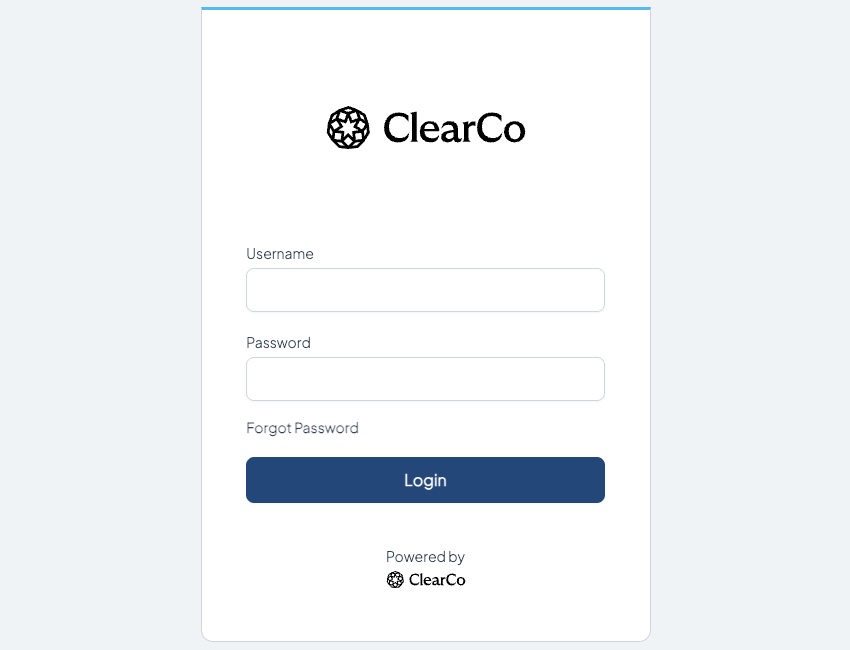
        <p>Log in to your Brainier LMS site at `https://{subdomain}.brainier.com` with an account that has Administrator privileges.</p>

        <img src="https://mintcdn.com/stackone-60/i2Gb6mQbr5-3RIAI/connectors/brainier/images/brainier-login.png?fit=max&auto=format&n=i2Gb6mQbr5-3RIAI&q=85&s=17b1107b41b953663a25a28135844f6d" alt="Brainier LMS Login" width="850" height="650" data-path="connectors/brainier/images/brainier-login.png" />
      </div>
    </Step>

    <Step title="Access API Client Management">
      <div data-guide-step data-guide-scopes="" data-guide-display-scopes-list="">
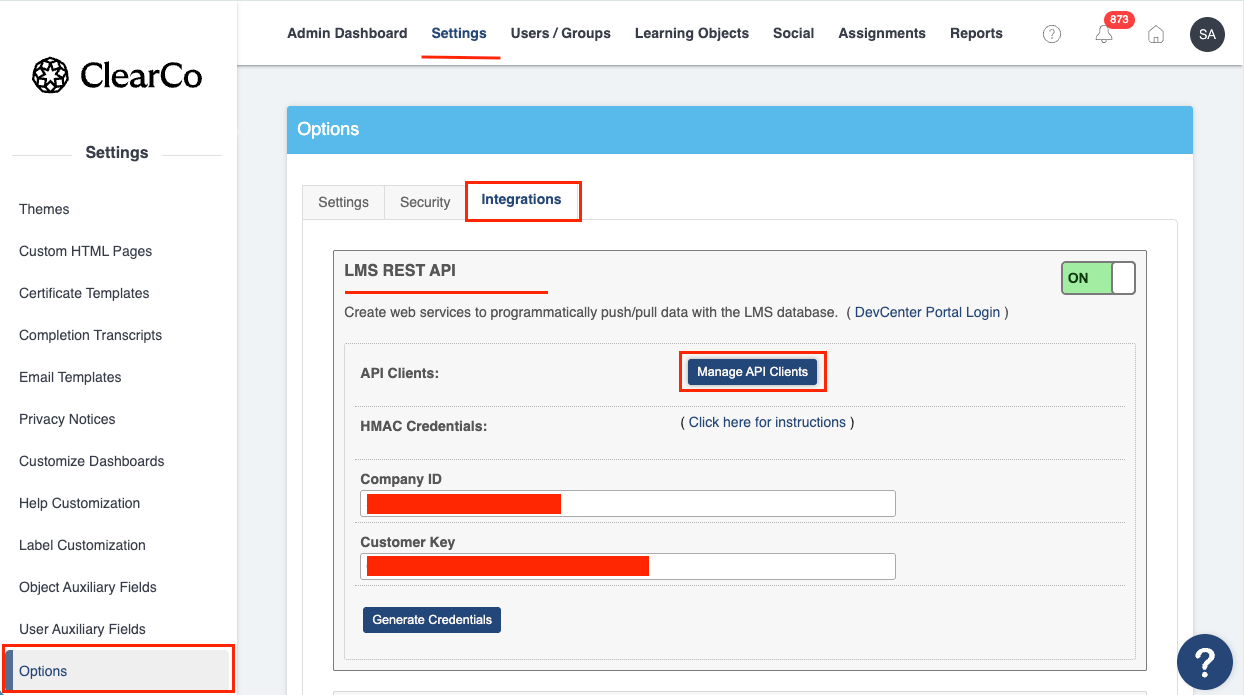
        <p>Navigate to <strong>⚙️ Administration</strong> (top right corner) > <strong>Settings</strong> > <strong>Options</strong> > <strong>Integrations</strong> > <strong>Elan/LMS REST API</strong>, then click the <strong>Manage API Clients</strong> button.</p>

        <img src="https://mintcdn.com/stackone-60/i2Gb6mQbr5-3RIAI/connectors/brainier/images/brainier-api-client-management.png?fit=max&auto=format&n=i2Gb6mQbr5-3RIAI&q=85&s=9fdc1b7db865195555873f376b902a8f" alt="Brainier LMS API Client Management" width="1244" height="695" data-path="connectors/brainier/images/brainier-api-client-management.png" />
      </div>
    </Step>

    <Step title="Create New API Client">
      <div data-guide-step data-guide-scopes="" data-guide-display-scopes-list="">
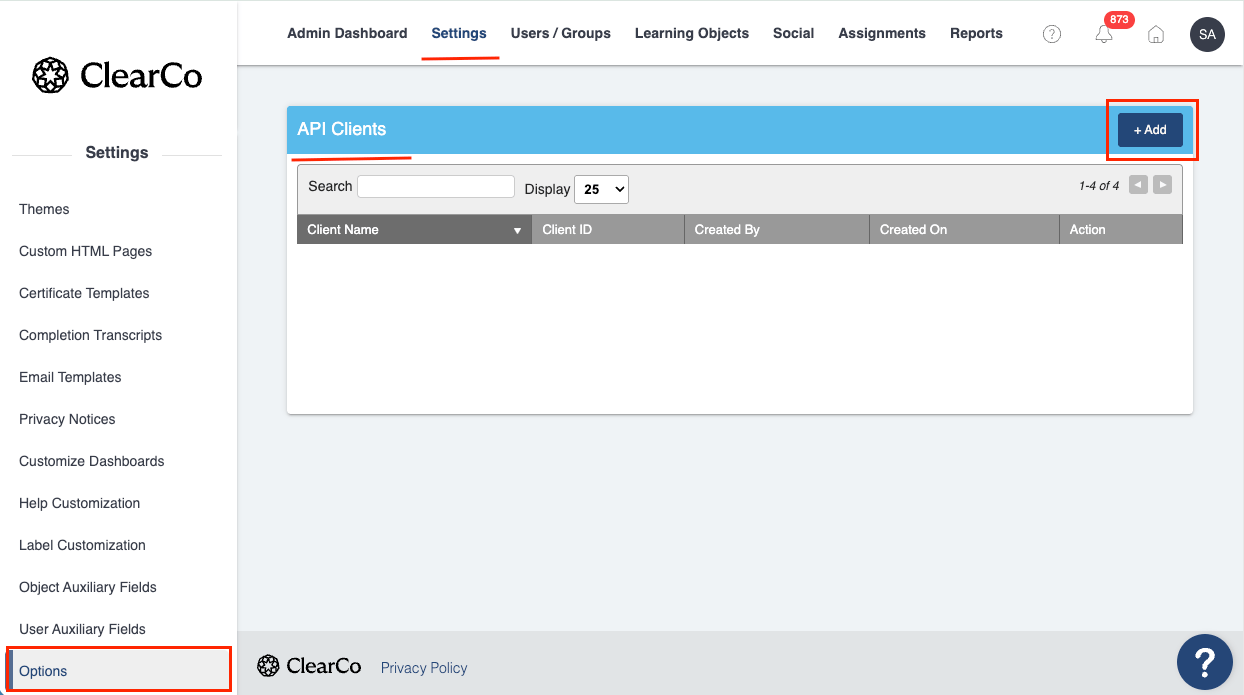
        <p>Click the <strong>Add</strong> button in the top right corner of the screen.</p>

        <img src="https://mintcdn.com/stackone-60/i2Gb6mQbr5-3RIAI/connectors/brainier/images/brainier-api-client-add.png?fit=max&auto=format&n=i2Gb6mQbr5-3RIAI&q=85&s=872caf90aa20838c7908dd489b338c59" alt="Brainier LMS API Client Add" width="1244" height="695" data-path="connectors/brainier/images/brainier-api-client-add.png" />
      </div>
    </Step>

    <Step title="Configure API Client Settings">
      <div data-guide-step data-guide-scopes="Assignments,Authors,Bookmarks,Forms,Groups,LearningObjects,Roles,Tags,UserObjectRecords,Users" data-guide-display-scopes-list="Assignments,Authors,Bookmarks,Forms,Groups,LearningObjects,Roles,Tags,UserObjectRecords,Users">
        <div className="connector-guide-actions-badge" data-guide-actions-badge data-guide-actions-badge-scopes="Assignments,Authors,Bookmarks,Forms,Groups,LearningObjects,Roles,Tags,UserObjectRecords,Users">
          <span>Enables actions: </span><span data-guide-actions-badge-labels>Add User To Group, Create Assigned Group, Create Assigned Object, Create Assigned User, Create Assignment, Create Bookmark, Create Group, Create Object Access, Create User, Create User Object Record, Get All Object Authors, Get Assigned Groups, Get Assigned Objects, Get Assigned Users, Get Assignments, Get Assignments By User, Get Bookmarked Objects, Get Class Schedules Info, Get Form Options, Get Form Questions And Answers, Get Learning Object Comments, Get Learning Object Info, Get Multiple Groups Info, Get Multiple Learning Objects Info, Get Multiple Roles Info, Get Multiple Users Info, Get Object Access, Get Object Authors, Get Objects By Author, Get Single Group Info, Get Single Role Info, Get Single User Info, Get Tags, Get User Form Answers, Get User Object Records, Remove Assigned Group, Remove Assigned Object, Remove Assigned User, Remove Bookmark, Remove Object Access, Remove User From Group, Send Form Answers, Unregister From Class, Update Group Info, Update User Info, Update User Object Record, Upload User Avatar</span>
        </div>

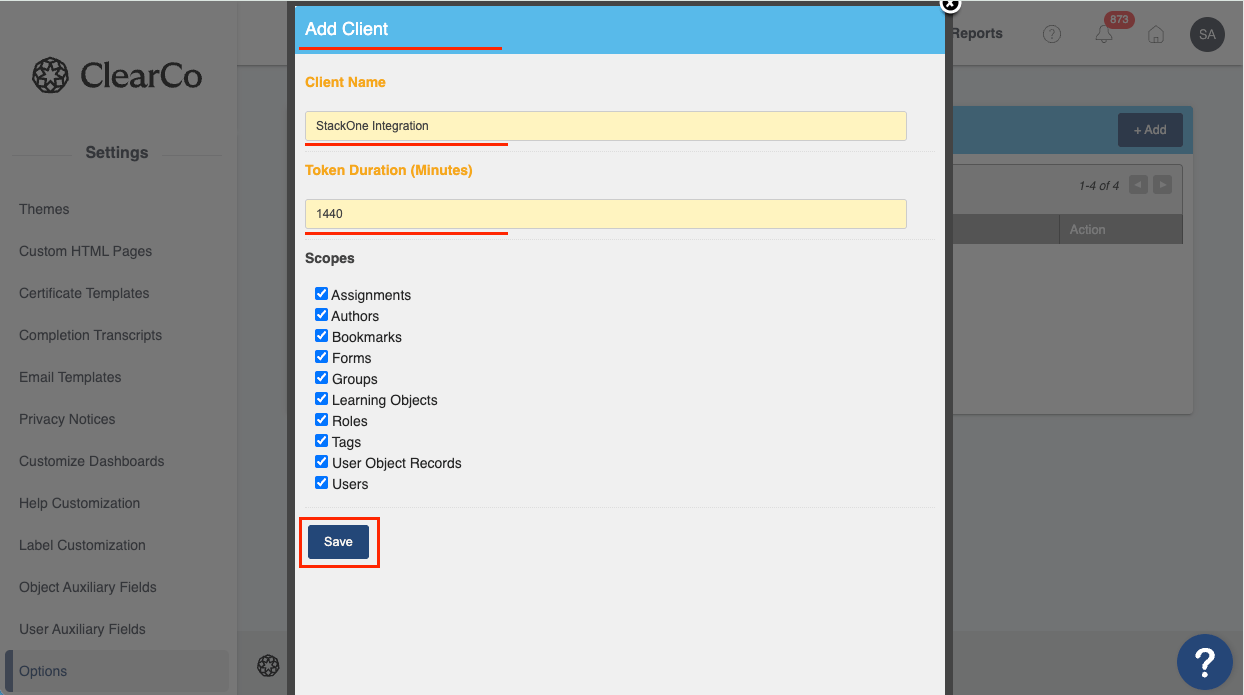
        <p>Fill in the following fields.</p>

        <ul>
          <li><strong>Client Name</strong>: Enter a descriptive name (e.g., StackOne Integration)</li>
          <li><strong>Token Duration (minutes)</strong>: Set the access token validity period. Maximum: 1440 (24 hours)</li>
          <li><strong>Scopes</strong>: Select the scopes required for your integration (e.g., Learning Objects, User Object Records, Users, Groups, Assignments).</li>
        </ul>

        <img src="https://mintcdn.com/stackone-60/i2Gb6mQbr5-3RIAI/connectors/brainier/images/brainier-api-scopes.png?fit=max&auto=format&n=i2Gb6mQbr5-3RIAI&q=85&s=c999d390d95ce43135ca33f7d3f158e0" alt="Brainier LMS API Scopes" width="1244" height="695" data-path="connectors/brainier/images/brainier-api-scopes.png" />

        <div className="connector-guide-display-scopes" data-guide-display-scopes>
          <div className="connector-guide-scopes-container">
            <ul className="not-prose connector-guide-scopes-list">
              <li data-guide-display-scope="Assignments">
                <button type="button" className="connector-guide-scope-copy" aria-label="Copy Assignments" title="Copy scope" data-copy="Assignments">
                  <span className="connector-guide-scope-copy__label">Assignments</span>
                  <span className="connector-guide-scope-copy__icon" aria-hidden="true">⧉</span>
                </button>
              </li>

              <li data-guide-display-scope="Authors">
                <button type="button" className="connector-guide-scope-copy" aria-label="Copy Authors" title="Copy scope" data-copy="Authors">
                  <span className="connector-guide-scope-copy__label">Authors</span>
                  <span className="connector-guide-scope-copy__icon" aria-hidden="true">⧉</span>
                </button>
              </li>

              <li data-guide-display-scope="Bookmarks">
                <button type="button" className="connector-guide-scope-copy" aria-label="Copy Bookmarks" title="Copy scope" data-copy="Bookmarks">
                  <span className="connector-guide-scope-copy__label">Bookmarks</span>
                  <span className="connector-guide-scope-copy__icon" aria-hidden="true">⧉</span>
                </button>
              </li>

              <li data-guide-display-scope="Forms">
                <button type="button" className="connector-guide-scope-copy" aria-label="Copy Forms" title="Copy scope" data-copy="Forms">
                  <span className="connector-guide-scope-copy__label">Forms</span>
                  <span className="connector-guide-scope-copy__icon" aria-hidden="true">⧉</span>
                </button>
              </li>

              <li data-guide-display-scope="Groups">
                <button type="button" className="connector-guide-scope-copy" aria-label="Copy Groups" title="Copy scope" data-copy="Groups">
                  <span className="connector-guide-scope-copy__label">Groups</span>
                  <span className="connector-guide-scope-copy__icon" aria-hidden="true">⧉</span>
                </button>
              </li>

              <li data-guide-display-scope="LearningObjects">
                <button type="button" className="connector-guide-scope-copy" aria-label="Copy LearningObjects" title="Copy scope" data-copy="LearningObjects">
                  <span className="connector-guide-scope-copy__label">LearningObjects</span>
                  <span className="connector-guide-scope-copy__icon" aria-hidden="true">⧉</span>
                </button>
              </li>

              <li data-guide-display-scope="Roles">
                <button type="button" className="connector-guide-scope-copy" aria-label="Copy Roles" title="Copy scope" data-copy="Roles">
                  <span className="connector-guide-scope-copy__label">Roles</span>
                  <span className="connector-guide-scope-copy__icon" aria-hidden="true">⧉</span>
                </button>
              </li>

              <li data-guide-display-scope="Tags">
                <button type="button" className="connector-guide-scope-copy" aria-label="Copy Tags" title="Copy scope" data-copy="Tags">
                  <span className="connector-guide-scope-copy__label">Tags</span>
                  <span className="connector-guide-scope-copy__icon" aria-hidden="true">⧉</span>
                </button>
              </li>

              <li data-guide-display-scope="UserObjectRecords">
                <button type="button" className="connector-guide-scope-copy" aria-label="Copy UserObjectRecords" title="Copy scope" data-copy="UserObjectRecords">
                  <span className="connector-guide-scope-copy__label">UserObjectRecords</span>
                  <span className="connector-guide-scope-copy__icon" aria-hidden="true">⧉</span>
                </button>
              </li>

              <li data-guide-display-scope="Users">
                <button type="button" className="connector-guide-scope-copy" aria-label="Copy Users" title="Copy scope" data-copy="Users">
                  <span className="connector-guide-scope-copy__label">Users</span>
                  <span className="connector-guide-scope-copy__icon" aria-hidden="true">⧉</span>
                </button>
              </li>
            </ul>
          </div>
        </div>
      </div>
    </Step>

    <Step title="Save and Retrieve Credentials">
      <div data-guide-step data-guide-scopes="" data-guide-display-scopes-list="">
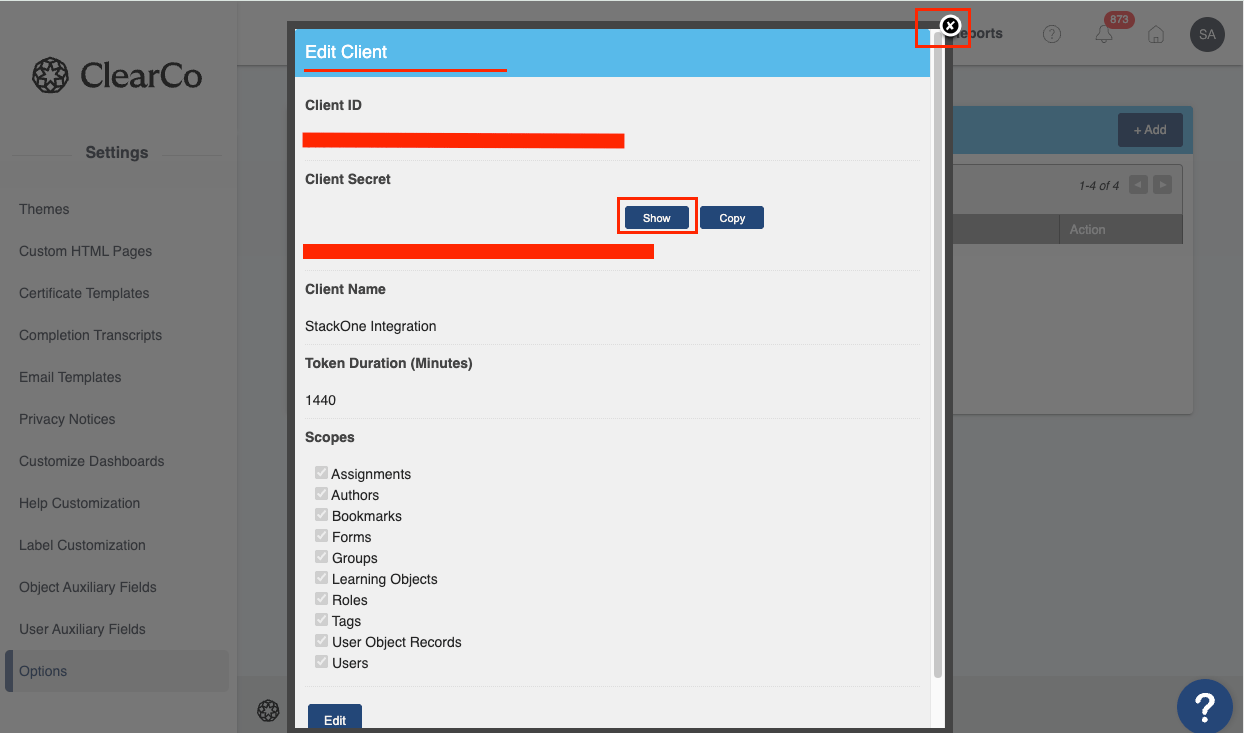
        <p>Click <strong>Save</strong> to create the API Client. After saving, two new fields will appear: <strong>Client ID</strong> and <strong>Client Secret</strong>. Copy both values and store them securely for later use. The Client Secret will not be shown again.</p>

        <img src="https://mintcdn.com/stackone-60/i2Gb6mQbr5-3RIAI/connectors/brainier/images/brainier-api-copy-creds.png?fit=max&auto=format&n=i2Gb6mQbr5-3RIAI&q=85&s=9980c8a53551e64c33fed6278904f324" alt="Brainier LMS API Copy Credentials" width="1244" height="733" data-path="connectors/brainier/images/brainier-api-copy-creds.png" />
      </div>
    </Step>
  </Steps>
</section>

<section data-guide-section data-guide-scopes="">
  <h2>Gather Required Information</h2>

  <p>Collect the following information to link your Brainier account with StackOne.</p>

  <Steps>
    <Step title="Find Your Subdomain">
      <div data-guide-step data-guide-scopes="" data-guide-display-scopes-list="">
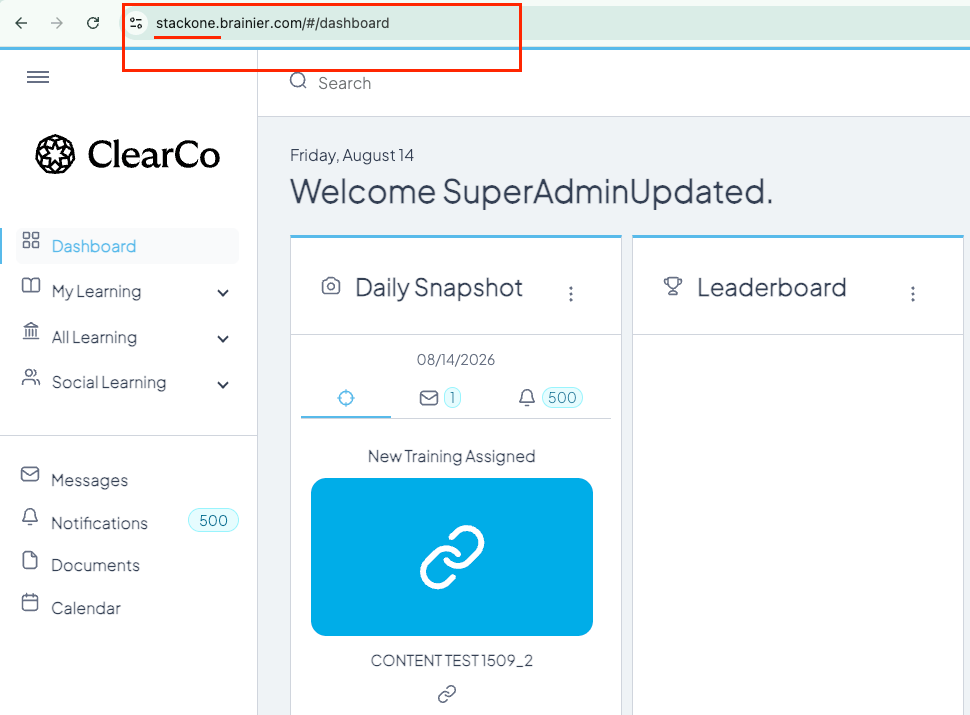
        <p>Your Brainier subdomain is the first part of your Brainier URL.</p>

        <ul>
          <li>Format: `https://{subdomain}.brainier.com`</li>
          <li>Example: If your URL is `https://mycompany.brainier.com`, your subdomain is `mycompany`</li>
          <li>Note: Do not include `.brainier.com` in the subdomain field</li>
        </ul>

        <img src="https://mintcdn.com/stackone-60/i2Gb6mQbr5-3RIAI/connectors/brainier/images/brainier-api-subdomain.png?fit=max&auto=format&n=i2Gb6mQbr5-3RIAI&q=85&s=86ba23c375fa40693dc784873239cb6f" alt="Brainier LMS Subdomain" width="970" height="715" data-path="connectors/brainier/images/brainier-api-subdomain.png" />
      </div>
    </Step>

    <Step title="Identify Username (Optional)">
      <div data-guide-step data-guide-scopes="" data-guide-display-scopes-list="">
        <p>Identify the username of the account you would like to associate with this connection. This is typically a SuperAdmin account or a dedicated service account with the appropriate permissions.</p>

        <ul>
          <li>Note: If left blank, the connection will use the default SuperAdmin account.</li>
        </ul>
      </div>
    </Step>

    <Step title="API Client IP (Optional)">
      <div data-guide-step data-guide-scopes="" data-guide-display-scopes-list="">
        <p>If your Brainier API Client was configured with an IP restriction, enter the IP address in the <strong>API Client IP</strong> field when linking the account. This value is used to identify the origin of API traffic.</p>

        <ul>
          <li>You can find this in your Brainier API Client settings under <strong>Administration</strong> > <strong>Settings</strong> > <strong>Options</strong> > <strong>Integrations</strong> > <strong>Elan/LMS REST API</strong> > <strong>Manage API Clients</strong>.</li>
          <li>If no IP restriction was set on the API Client, leave this field blank.</li>
        </ul>
      </div>
    </Step>
  </Steps>
</section>

<div data-whitelabel-hide>
  <h2>Linking the Account from the Hub</h2>

  <Steps>
    <Step title="Navigate to the Hub">
      Use one of the three <a href="/connect/managing-connectors/linking-accounts">Linking Account Methods</a> to access the Hub.
    </Step>

    <Step title="Fill out the fields">
      Fill out the following fields using details from your provider:

      <ul>
        <li><strong>Client ID</strong></li>
        <li><strong>Client Secret</strong></li>
        <li><strong>Subdomain</strong></li>
        <li><strong>Username</strong> (Optional)</li>
        <li><strong>API Client IP</strong> (Optional)</li>
      </ul>
    </Step>

    <Step title="Connect">
      <ul>
        <li>Click <strong>Connect</strong></li>
        <li>If applicable, the provider will redirect you to a sign-in or authorization page. Complete the provider's authorization flow.</li>
        <li>Once authorization is successful, you will see a confirmation popup</li>
      </ul>
    </Step>
  </Steps>

  <p>If the account linking is successful, you will see the newly linked account in your <a href="/gateway/concepts/linked-accounts">Accounts</a> page.</p>
</div>