> ## Documentation Index
> Fetch the complete documentation index at: https://docs.stackone.com/llms.txt
> Use this file to discover all available pages before exploring further.

# Bing Ads (Microsoft Ads) OAuth 2.0 connector profile – StackOne setup guide

> Set up the OAuth 2.0 connector profile for Bing Ads (Microsoft Ads) in StackOne. One-time admin setup required before your users can link Bing Ads (Microsoft Ads) accounts via Hub.

<Warning>You need permission to register applications in your Microsoft Entra ID tenant. Note: end users cannot grant consent to newly registered multitenant apps without verified publishers.</Warning>

<Panel>
  <div className="not-prose guides-scope-selector" data-guides-scope-selector data-guide-actions-json="[{&#x22;id&#x22;:&#x22;bingads_add_account&#x22;,&#x22;label&#x22;:&#x22;Add Account&#x22;,&#x22;scopes&#x22;:[&#x22;https://ads.microsoft.com/msads.manage&#x22;]},{&#x22;id&#x22;:&#x22;bingads_delete_account&#x22;,&#x22;label&#x22;:&#x22;Delete Account&#x22;,&#x22;scopes&#x22;:[&#x22;https://ads.microsoft.com/msads.manage&#x22;]},{&#x22;id&#x22;:&#x22;bingads_get_account&#x22;,&#x22;label&#x22;:&#x22;Get Account&#x22;,&#x22;scopes&#x22;:[&#x22;https://ads.microsoft.com/msads.manage&#x22;]},{&#x22;id&#x22;:&#x22;bingads_update_account&#x22;,&#x22;label&#x22;:&#x22;Update Account&#x22;,&#x22;scopes&#x22;:[&#x22;https://ads.microsoft.com/msads.manage&#x22;]},{&#x22;id&#x22;:&#x22;bingads_find_accounts&#x22;,&#x22;label&#x22;:&#x22;Find Accounts&#x22;,&#x22;scopes&#x22;:[&#x22;https://ads.microsoft.com/msads.manage&#x22;]},{&#x22;id&#x22;:&#x22;bingads_search_accounts&#x22;,&#x22;label&#x22;:&#x22;Search Accounts&#x22;,&#x22;scopes&#x22;:[&#x22;https://ads.microsoft.com/msads.manage&#x22;]},{&#x22;id&#x22;:&#x22;bingads_find_accounts_or_customers_info&#x22;,&#x22;label&#x22;:&#x22;Find Accounts Or Customers Info&#x22;,&#x22;scopes&#x22;:[&#x22;https://ads.microsoft.com/msads.manage&#x22;]},{&#x22;id&#x22;:&#x22;bingads_get_customer&#x22;,&#x22;label&#x22;:&#x22;Get Customer&#x22;,&#x22;scopes&#x22;:[&#x22;https://ads.microsoft.com/msads.manage&#x22;]},{&#x22;id&#x22;:&#x22;bingads_update_customer&#x22;,&#x22;label&#x22;:&#x22;Update Customer&#x22;,&#x22;scopes&#x22;:[&#x22;https://ads.microsoft.com/msads.manage&#x22;]},{&#x22;id&#x22;:&#x22;bingads_search_customers&#x22;,&#x22;label&#x22;:&#x22;Search Customers&#x22;,&#x22;scopes&#x22;:[&#x22;https://ads.microsoft.com/msads.manage&#x22;]},{&#x22;id&#x22;:&#x22;bingads_search_companies&#x22;,&#x22;label&#x22;:&#x22;Search Companies&#x22;,&#x22;scopes&#x22;:[&#x22;https://ads.microsoft.com/msads.manage&#x22;]},{&#x22;id&#x22;:&#x22;bingads_delete_user&#x22;,&#x22;label&#x22;:&#x22;Delete User&#x22;,&#x22;scopes&#x22;:[&#x22;https://ads.microsoft.com/msads.manage&#x22;]},{&#x22;id&#x22;:&#x22;bingads_get_user&#x22;,&#x22;label&#x22;:&#x22;Get User&#x22;,&#x22;scopes&#x22;:[&#x22;https://ads.microsoft.com/msads.manage&#x22;]},{&#x22;id&#x22;:&#x22;bingads_update_user&#x22;,&#x22;label&#x22;:&#x22;Update User&#x22;,&#x22;scopes&#x22;:[&#x22;https://ads.microsoft.com/msads.manage&#x22;]},{&#x22;id&#x22;:&#x22;bingads_search_user_invitations&#x22;,&#x22;label&#x22;:&#x22;Search User Invitations&#x22;,&#x22;scopes&#x22;:[&#x22;https://ads.microsoft.com/msads.manage&#x22;]},{&#x22;id&#x22;:&#x22;bingads_send_user_invitation&#x22;,&#x22;label&#x22;:&#x22;Send User Invitation&#x22;,&#x22;scopes&#x22;:[&#x22;https://ads.microsoft.com/msads.manage&#x22;]},{&#x22;id&#x22;:&#x22;bingads_get_users_info&#x22;,&#x22;label&#x22;:&#x22;Get Users Info&#x22;,&#x22;scopes&#x22;:[&#x22;https://ads.microsoft.com/msads.manage&#x22;]},{&#x22;id&#x22;:&#x22;bingads_search_client_links&#x22;,&#x22;label&#x22;:&#x22;Search Client Links&#x22;,&#x22;scopes&#x22;:[&#x22;https://ads.microsoft.com/msads.manage&#x22;]},{&#x22;id&#x22;:&#x22;bingads_search_coupons&#x22;,&#x22;label&#x22;:&#x22;Search Coupons&#x22;,&#x22;scopes&#x22;:[&#x22;https://ads.microsoft.com/msads.manage&#x22;]},{&#x22;id&#x22;:&#x22;bingads_search_insertion_orders&#x22;,&#x22;label&#x22;:&#x22;Search Insertion Orders&#x22;,&#x22;scopes&#x22;:[&#x22;https://ads.microsoft.com/msads.manage&#x22;]},{&#x22;id&#x22;:&#x22;bingads_add_campaigns&#x22;,&#x22;label&#x22;:&#x22;Add Campaigns&#x22;,&#x22;scopes&#x22;:[&#x22;https://ads.microsoft.com/msads.manage&#x22;]},{&#x22;id&#x22;:&#x22;bingads_delete_campaigns&#x22;,&#x22;label&#x22;:&#x22;Delete Campaigns&#x22;,&#x22;scopes&#x22;:[&#x22;https://ads.microsoft.com/msads.manage&#x22;]},{&#x22;id&#x22;:&#x22;bingads_get_campaigns_by_account_id&#x22;,&#x22;label&#x22;:&#x22;Get Campaigns By Account Id&#x22;,&#x22;scopes&#x22;:[&#x22;https://ads.microsoft.com/msads.manage&#x22;]},{&#x22;id&#x22;:&#x22;bingads_get_campaigns_by_ids&#x22;,&#x22;label&#x22;:&#x22;Get Campaigns By Ids&#x22;,&#x22;scopes&#x22;:[&#x22;https://ads.microsoft.com/msads.manage&#x22;]},{&#x22;id&#x22;:&#x22;bingads_update_campaigns&#x22;,&#x22;label&#x22;:&#x22;Update Campaigns&#x22;,&#x22;scopes&#x22;:[&#x22;https://ads.microsoft.com/msads.manage&#x22;]},{&#x22;id&#x22;:&#x22;bingads_add_ad_groups&#x22;,&#x22;label&#x22;:&#x22;Add Ad Groups&#x22;,&#x22;scopes&#x22;:[&#x22;https://ads.microsoft.com/msads.manage&#x22;]},{&#x22;id&#x22;:&#x22;bingads_delete_ad_groups&#x22;,&#x22;label&#x22;:&#x22;Delete Ad Groups&#x22;,&#x22;scopes&#x22;:[&#x22;https://ads.microsoft.com/msads.manage&#x22;]},{&#x22;id&#x22;:&#x22;bingads_get_ad_groups_by_campaign_id&#x22;,&#x22;label&#x22;:&#x22;Get Ad Groups By Campaign Id&#x22;,&#x22;scopes&#x22;:[&#x22;https://ads.microsoft.com/msads.manage&#x22;]},{&#x22;id&#x22;:&#x22;bingads_get_ad_groups_by_ids&#x22;,&#x22;label&#x22;:&#x22;Get Ad Groups By Ids&#x22;,&#x22;scopes&#x22;:[&#x22;https://ads.microsoft.com/msads.manage&#x22;]},{&#x22;id&#x22;:&#x22;bingads_update_ad_groups&#x22;,&#x22;label&#x22;:&#x22;Update Ad Groups&#x22;,&#x22;scopes&#x22;:[&#x22;https://ads.microsoft.com/msads.manage&#x22;]},{&#x22;id&#x22;:&#x22;bingads_add_ads&#x22;,&#x22;label&#x22;:&#x22;Add Ads&#x22;,&#x22;scopes&#x22;:[&#x22;https://ads.microsoft.com/msads.manage&#x22;]},{&#x22;id&#x22;:&#x22;bingads_delete_ads&#x22;,&#x22;label&#x22;:&#x22;Delete Ads&#x22;,&#x22;scopes&#x22;:[&#x22;https://ads.microsoft.com/msads.manage&#x22;]},{&#x22;id&#x22;:&#x22;bingads_get_ads_by_ad_group_id&#x22;,&#x22;label&#x22;:&#x22;Get Ads By Ad Group Id&#x22;,&#x22;scopes&#x22;:[&#x22;https://ads.microsoft.com/msads.manage&#x22;]},{&#x22;id&#x22;:&#x22;bingads_get_ads_by_editorial_status&#x22;,&#x22;label&#x22;:&#x22;Get Ads By Editorial Status&#x22;,&#x22;scopes&#x22;:[&#x22;https://ads.microsoft.com/msads.manage&#x22;]},{&#x22;id&#x22;:&#x22;bingads_get_ads_by_ids&#x22;,&#x22;label&#x22;:&#x22;Get Ads By Ids&#x22;,&#x22;scopes&#x22;:[&#x22;https://ads.microsoft.com/msads.manage&#x22;]},{&#x22;id&#x22;:&#x22;bingads_update_ads&#x22;,&#x22;label&#x22;:&#x22;Update Ads&#x22;,&#x22;scopes&#x22;:[&#x22;https://ads.microsoft.com/msads.manage&#x22;]},{&#x22;id&#x22;:&#x22;bingads_add_keywords&#x22;,&#x22;label&#x22;:&#x22;Add Keywords&#x22;,&#x22;scopes&#x22;:[&#x22;https://ads.microsoft.com/msads.manage&#x22;]},{&#x22;id&#x22;:&#x22;bingads_delete_keywords&#x22;,&#x22;label&#x22;:&#x22;Delete Keywords&#x22;,&#x22;scopes&#x22;:[&#x22;https://ads.microsoft.com/msads.manage&#x22;]},{&#x22;id&#x22;:&#x22;bingads_get_keywords_by_ad_group_id&#x22;,&#x22;label&#x22;:&#x22;Get Keywords By Ad Group Id&#x22;,&#x22;scopes&#x22;:[&#x22;https://ads.microsoft.com/msads.manage&#x22;]},{&#x22;id&#x22;:&#x22;bingads_get_keywords_by_editorial_status&#x22;,&#x22;label&#x22;:&#x22;Get Keywords By Editorial Status&#x22;,&#x22;scopes&#x22;:[&#x22;https://ads.microsoft.com/msads.manage&#x22;]},{&#x22;id&#x22;:&#x22;bingads_get_keywords_by_ids&#x22;,&#x22;label&#x22;:&#x22;Get Keywords By Ids&#x22;,&#x22;scopes&#x22;:[&#x22;https://ads.microsoft.com/msads.manage&#x22;]},{&#x22;id&#x22;:&#x22;bingads_update_keywords&#x22;,&#x22;label&#x22;:&#x22;Update Keywords&#x22;,&#x22;scopes&#x22;:[&#x22;https://ads.microsoft.com/msads.manage&#x22;]},{&#x22;id&#x22;:&#x22;bingads_add_audiences&#x22;,&#x22;label&#x22;:&#x22;Add Audiences&#x22;,&#x22;scopes&#x22;:[&#x22;https://ads.microsoft.com/msads.manage&#x22;]},{&#x22;id&#x22;:&#x22;bingads_delete_audiences&#x22;,&#x22;label&#x22;:&#x22;Delete Audiences&#x22;,&#x22;scopes&#x22;:[&#x22;https://ads.microsoft.com/msads.manage&#x22;]},{&#x22;id&#x22;:&#x22;bingads_get_audiences_by_ids&#x22;,&#x22;label&#x22;:&#x22;Get Audiences By Ids&#x22;,&#x22;scopes&#x22;:[&#x22;https://ads.microsoft.com/msads.manage&#x22;]},{&#x22;id&#x22;:&#x22;bingads_update_audiences&#x22;,&#x22;label&#x22;:&#x22;Update Audiences&#x22;,&#x22;scopes&#x22;:[&#x22;https://ads.microsoft.com/msads.manage&#x22;]},{&#x22;id&#x22;:&#x22;bingads_add_budgets&#x22;,&#x22;label&#x22;:&#x22;Add Budgets&#x22;,&#x22;scopes&#x22;:[&#x22;https://ads.microsoft.com/msads.manage&#x22;]},{&#x22;id&#x22;:&#x22;bingads_delete_budgets&#x22;,&#x22;label&#x22;:&#x22;Delete Budgets&#x22;,&#x22;scopes&#x22;:[&#x22;https://ads.microsoft.com/msads.manage&#x22;]},{&#x22;id&#x22;:&#x22;bingads_get_budgets_by_ids&#x22;,&#x22;label&#x22;:&#x22;Get Budgets By Ids&#x22;,&#x22;scopes&#x22;:[&#x22;https://ads.microsoft.com/msads.manage&#x22;]},{&#x22;id&#x22;:&#x22;bingads_update_budgets&#x22;,&#x22;label&#x22;:&#x22;Update Budgets&#x22;,&#x22;scopes&#x22;:[&#x22;https://ads.microsoft.com/msads.manage&#x22;]},{&#x22;id&#x22;:&#x22;bingads_add_conversion_goals&#x22;,&#x22;label&#x22;:&#x22;Add Conversion Goals&#x22;,&#x22;scopes&#x22;:[&#x22;https://ads.microsoft.com/msads.manage&#x22;]},{&#x22;id&#x22;:&#x22;bingads_get_conversion_goals_by_ids&#x22;,&#x22;label&#x22;:&#x22;Get Conversion Goals By Ids&#x22;,&#x22;scopes&#x22;:[&#x22;https://ads.microsoft.com/msads.manage&#x22;]},{&#x22;id&#x22;:&#x22;bingads_get_conversion_goals_by_tag_ids&#x22;,&#x22;label&#x22;:&#x22;Get Conversion Goals By Tag Ids&#x22;,&#x22;scopes&#x22;:[&#x22;https://ads.microsoft.com/msads.manage&#x22;]},{&#x22;id&#x22;:&#x22;bingads_update_conversion_goals&#x22;,&#x22;label&#x22;:&#x22;Update Conversion Goals&#x22;,&#x22;scopes&#x22;:[&#x22;https://ads.microsoft.com/msads.manage&#x22;]},{&#x22;id&#x22;:&#x22;bingads_add_uet_tags&#x22;,&#x22;label&#x22;:&#x22;Add Uet Tags&#x22;,&#x22;scopes&#x22;:[&#x22;https://ads.microsoft.com/msads.manage&#x22;]},{&#x22;id&#x22;:&#x22;bingads_get_uet_tags_by_ids&#x22;,&#x22;label&#x22;:&#x22;Get Uet Tags By Ids&#x22;,&#x22;scopes&#x22;:[&#x22;https://ads.microsoft.com/msads.manage&#x22;]},{&#x22;id&#x22;:&#x22;bingads_update_uet_tags&#x22;,&#x22;label&#x22;:&#x22;Update Uet Tags&#x22;,&#x22;scopes&#x22;:[&#x22;https://ads.microsoft.com/msads.manage&#x22;]},{&#x22;id&#x22;:&#x22;bingads_get_bulk_upload_status&#x22;,&#x22;label&#x22;:&#x22;Get Bulk Upload Status&#x22;,&#x22;scopes&#x22;:[&#x22;https://ads.microsoft.com/msads.manage&#x22;]},{&#x22;id&#x22;:&#x22;bingads_get_bulk_upload_url&#x22;,&#x22;label&#x22;:&#x22;Get Bulk Upload Url&#x22;,&#x22;scopes&#x22;:[&#x22;https://ads.microsoft.com/msads.manage&#x22;]},{&#x22;id&#x22;:&#x22;bingads_get_historical_search_count&#x22;,&#x22;label&#x22;:&#x22;Get Historical Search Count&#x22;,&#x22;scopes&#x22;:[&#x22;https://ads.microsoft.com/msads.manage&#x22;]}]" style={{ borderRadius: '8px', padding: '16px', marginBottom: '24px' }}>
    <div className="guides-scope-selector__title" style={{ fontSize: '16px', fontWeight: '600', marginBottom: '12px' }}>Select Actions to adjust the guide</div>
    <div className="guides-scope-selector__muted" style={{ fontSize: '13px', marginBottom: '12px' }}>Some actions may require additional configuration in the provider to be accessible. Choose the actions you need and the guide will be updated.</div>

    <div style={{ display: 'flex', gap: '8px', marginBottom: '12px', flexWrap: 'wrap' }}>
      <input type="text" placeholder="Search actions..." className="guides-scope-selector__input" data-guide-action-search style={{ padding: '8px 12px', borderRadius: '6px', fontSize: '13px', flex: 1, minWidth: '160px' }} />

      <button type="button" className="guides-scope-selector__quick-btn" data-guide-select-all style={{ padding: '6px 10px', borderRadius: '6px', fontSize: '12px', cursor: 'pointer' }}>Select all</button>
      <button type="button" className="guides-scope-selector__quick-btn" data-guide-clear style={{ padding: '6px 10px', borderRadius: '6px', fontSize: '12px', cursor: 'pointer' }}>Clear</button>
    </div>

    <div className="guides-scope-selector__list" style={{ maxHeight: '240px', overflowY: 'auto', borderRadius: '6px', marginBottom: '12px' }}>
      <div className="guides-scope-selector__list-header" style={{ display: 'flex', alignItems: 'center', gap: '10px', padding: '8px 12px', fontSize: '12px', fontWeight: '600', position: 'sticky', top: 0, zIndex: 1 }}>
        <div style={{ width: '16px', flexShrink: 0 }} />

        <div style={{ flex: 1, textAlign: 'left' }}>Action</div>
        <div style={{ minWidth: '120px', marginLeft: 'auto', textAlign: 'right' }}>Scope(s)</div>
      </div>

      <div className="guides-scope-selector__muted" data-guide-loading style={{ padding: '16px', textAlign: 'center', fontSize: '13px' }}>Loading actions...</div>
      <div className="guides-scope-selector__muted" data-guide-no-results hidden style={{ padding: '16px', textAlign: 'center', fontSize: '13px' }}>No actions match your search.</div>
    </div>

    <div className="guides-scope-selector__url-section" style={{ marginTop: '12px', paddingTop: '12px' }}>
      <div className="guides-scope-selector__muted" style={{ fontSize: '12px', fontWeight: '500', marginBottom: '6px' }}>Dynamic Guide URL</div>

      <div style={{ display: 'flex', alignItems: 'center', gap: '8px', flexWrap: 'wrap' }}>
        <input type="text" readOnly className="guides-scope-selector__input" data-guide-url style={{ flex: 1, minWidth: '200px', padding: '8px 10px', borderRadius: '6px', fontSize: '12px', fontFamily: 'monospace' }} />

        <button type="button" className="guides-scope-selector__copy-btn" data-guide-copy-url style={{ width: '120px', padding: '8px 14px', borderRadius: '6px', fontSize: '13px', fontWeight: '500', cursor: 'pointer', whiteSpace: 'nowrap', marginLeft: 'auto' }}>Copy URL</button>
      </div>

      <div style={{ marginTop: '12px' }}>
        <div className="guides-scope-selector__muted" style={{ fontSize: '12px', fontWeight: '500', marginBottom: '6px' }}>Scopes Selected</div>

        <div style={{ display: 'flex', alignItems: 'stretch', gap: '8px', flexWrap: 'wrap' }}>
          <pre className="guides-scope-selector__input" role="textbox" aria-readonly="true" tabIndex={0} data-guide-scopes-output style={{ flex: 1, minWidth: '200px', minHeight: '88px', maxHeight: '120px', overflowY: 'auto', margin: 0, padding: '8px 10px', borderRadius: '6px', fontSize: '12px', fontFamily: 'monospace', whiteSpace: 'pre-wrap' }} />

          <div className="guides-scope-selector__muted" style={{ display: 'flex', flexDirection: 'column', gap: '8px', fontSize: '12px', fontWeight: '500', flexShrink: 0, alignItems: 'flex-start' }}>
            <div style={{ whiteSpace: 'nowrap' }}>Separator</div>

            <select className="guides-scope-selector__input" data-guide-scope-delimiter style={{ width: '100%', padding: '6px 10px', borderRadius: '6px', fontSize: '12px' }}>
              <option value="space">Space</option>
              <option value="comma">Comma</option>
              <option value="semicolon">Semicolon</option>
              <option value="pipe">Pipe</option>
              <option value="newline">Newline</option>
            </select>

            <button type="button" className="guides-scope-selector__copy-btn" data-guide-copy-scopes style={{ width: '120px', padding: '8px 14px', borderRadius: '6px', fontSize: '13px', fontWeight: '500', cursor: 'pointer', whiteSpace: 'nowrap' }}>Copy scopes</button>
          </div>
        </div>
      </div>
    </div>
  </div>
</Panel>

<section data-guide-section data-guide-scopes="">
  <h2>Register a Microsoft Entra ID application</h2>

  <p>Register an OAuth application in the Microsoft Entra admin center to obtain a Client ID and Client Secret for Microsoft Advertising.</p>

  <Steps>
    <Step title="Sign in to the Microsoft Entra admin center">
      <div data-guide-step data-guide-scopes="" data-guide-display-scopes-list="">
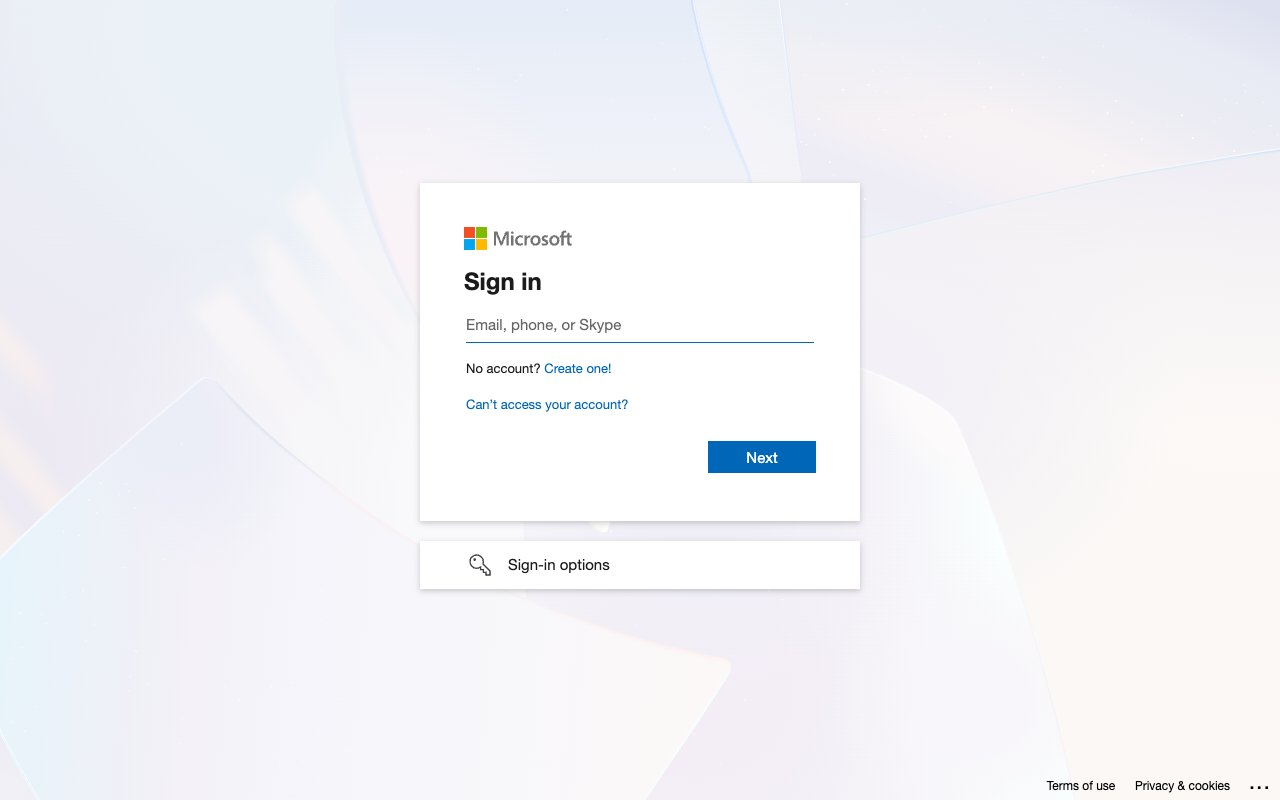
        <p>Open the <a href="https://entra.microsoft.com/" target="_blank" rel="noopener noreferrer">Microsoft Entra admin center</a> and sign in with your Microsoft work or personal account.</p>

        <img src="https://mintcdn.com/stackone-60/4cMWTegrJozhojrD/connectors/bingads/images/oauth2-setup-sign-in.png?fit=max&auto=format&n=4cMWTegrJozhojrD&q=85&s=3b6ff78bb6d93548c34f1c4b221cfb04" alt="Microsoft sign in page with the Email, phone, or Skype field and Next button" width="1280" height="800" data-path="connectors/bingads/images/oauth2-setup-sign-in.png" />
      </div>
    </Step>

    <Step title="Open App registrations">
      <div data-guide-step data-guide-scopes="" data-guide-display-scopes-list="">
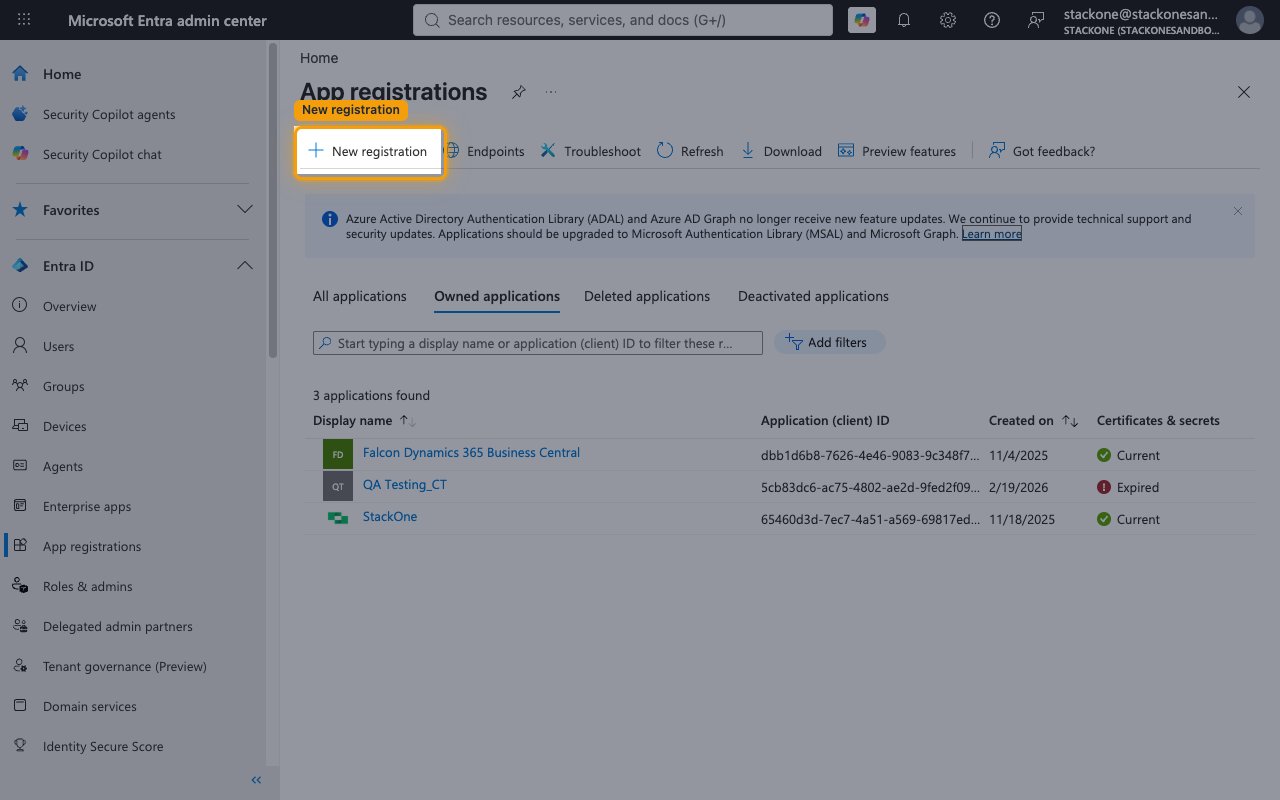
        <p>In the left sidebar under <strong>Entra ID</strong>, click <strong>App registrations</strong>, then click <strong>+ New registration</strong> in the toolbar.</p>

        <img src="https://mintcdn.com/stackone-60/4cMWTegrJozhojrD/connectors/bingads/images/oauth2-setup-app-registrations.png?fit=max&auto=format&n=4cMWTegrJozhojrD&q=85&s=7ac8e7df020f86a23d7cf8f5cd15a91e" alt="App registrations list with the New registration button highlighted" width="1280" height="800" data-path="connectors/bingads/images/oauth2-setup-app-registrations.png" />
      </div>
    </Step>

    <Step title="Choose the supported account types">
      <div data-guide-step data-guide-scopes="" data-guide-display-scopes-list="">
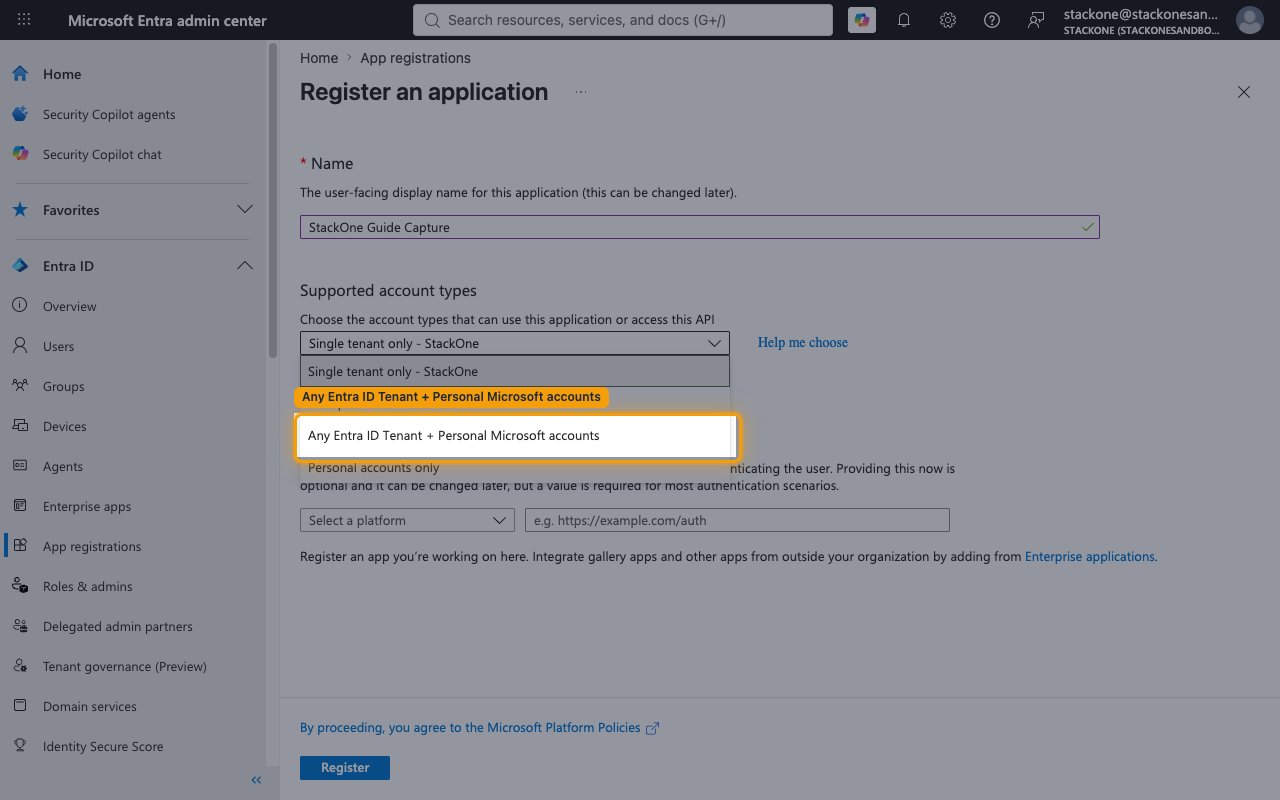
        <p>On the <strong>Register an application</strong> screen, enter a <strong>Name</strong> (e.g., StackOne Microsoft Advertising). Under <strong>Supported account types</strong>, open the dropdown and select <strong>Any Entra ID Tenant + Personal Microsoft accounts</strong> (shown as <strong>Accounts in any organizational directory (Any Microsoft Entra ID tenant - Multitenant) and personal Microsoft accounts (e.g. Skype, Xbox)</strong>).</p>

        <img src="https://mintcdn.com/stackone-60/4cMWTegrJozhojrD/connectors/bingads/images/oauth2-setup-account-types.png?fit=max&auto=format&n=4cMWTegrJozhojrD&q=85&s=f17cc061885a88ce5135d91464458470" alt="Supported account types dropdown open with Any Entra ID Tenant + Personal Microsoft accounts highlighted" width="1280" height="800" data-path="connectors/bingads/images/oauth2-setup-account-types.png" />
      </div>
    </Step>

    <Step title="Set the Redirect URI and register">
      <div data-guide-step data-guide-scopes="" data-guide-display-scopes-list="">
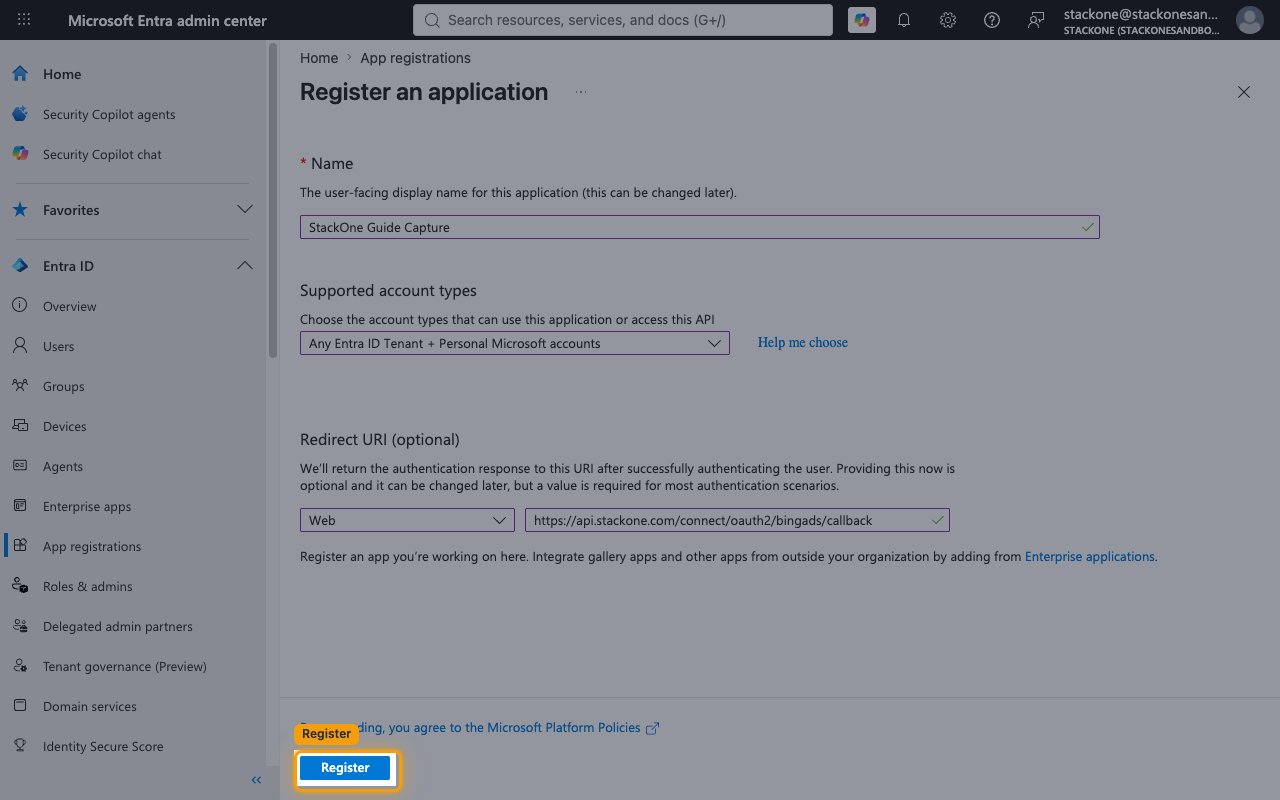
        <p>Under <strong>Redirect URI (optional)</strong>, select the <strong>Web</strong> platform and paste StackOne's callback URL, then click <strong>Register</strong>.</p>

        <ul>
          <li>Redirect URI: `https://api.stackone.com/connect/oauth2/bingads/callback`</li>
        </ul>

        <img src="https://mintcdn.com/stackone-60/4cMWTegrJozhojrD/connectors/bingads/images/oauth2-setup-register-form.png?fit=max&auto=format&n=4cMWTegrJozhojrD&q=85&s=62b542888f3044951be146a0a8e99d1e" alt="Completed Register an application form with Web platform, callback URI, and the Register button highlighted" width="1280" height="800" data-path="connectors/bingads/images/oauth2-setup-register-form.png" />
      </div>
    </Step>
  </Steps>
</section>

<section data-guide-section data-guide-scopes="">
  <h2>Create and copy your credentials</h2>

  <p>Copy the client ID and generate a client secret for the StackOne connection.</p>

  <Steps>
    <Step title="Copy the Application (client) ID">
      <div data-guide-step data-guide-scopes="" data-guide-display-scopes-list="">
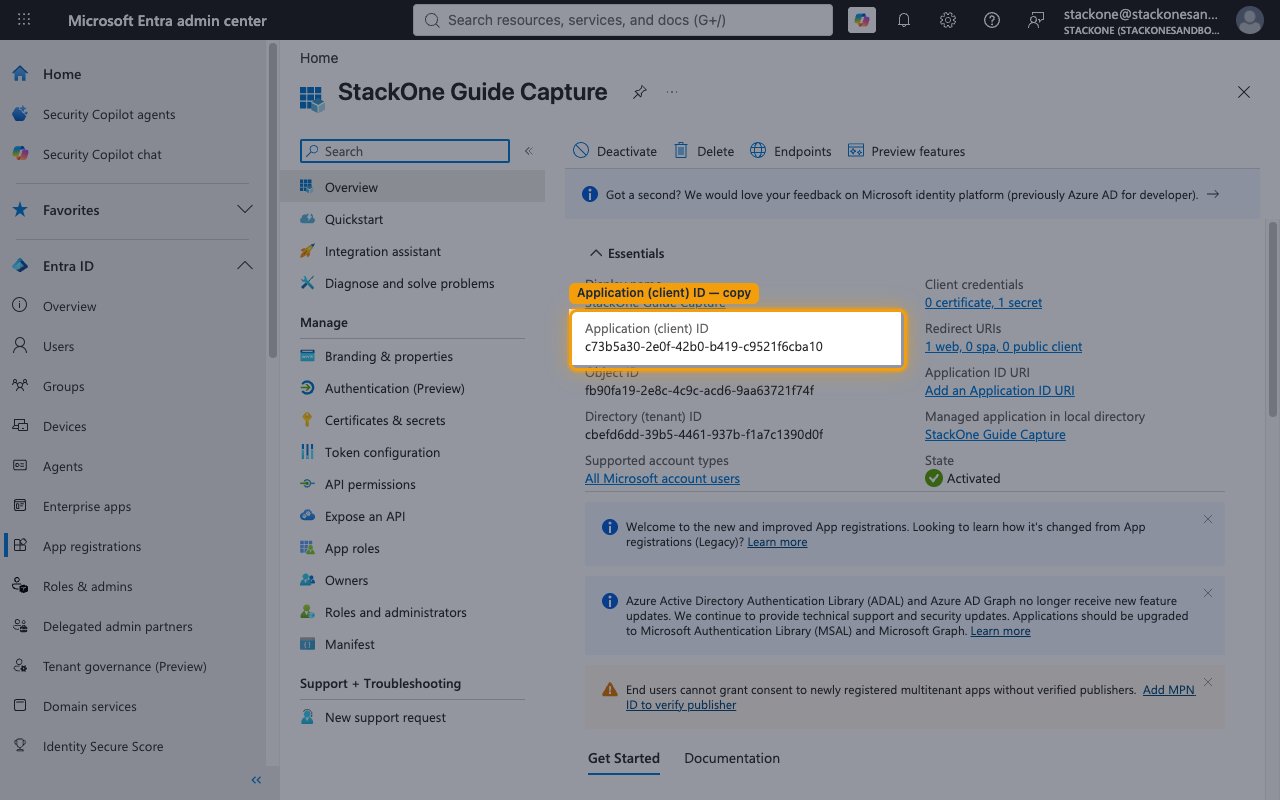
        <p>On the app's <strong>Overview</strong> page, in the <strong>Essentials</strong> panel, copy the <strong>Application (client) ID</strong> — this is the public identifier of your app. Paste it into the <strong>Client ID</strong> field in the StackOne Connector profile.</p>

        <img src="https://mintcdn.com/stackone-60/4cMWTegrJozhojrD/connectors/bingads/images/oauth2-setup-client-id.png?fit=max&auto=format&n=4cMWTegrJozhojrD&q=85&s=098cff5f7c31a88f189620d18724229f" alt="App Overview Essentials panel with the Application (client) ID highlighted" width="1280" height="800" data-path="connectors/bingads/images/oauth2-setup-client-id.png" />
      </div>
    </Step>

    <Step title="Open Certificates & secrets">
      <div data-guide-step data-guide-scopes="" data-guide-display-scopes-list="">
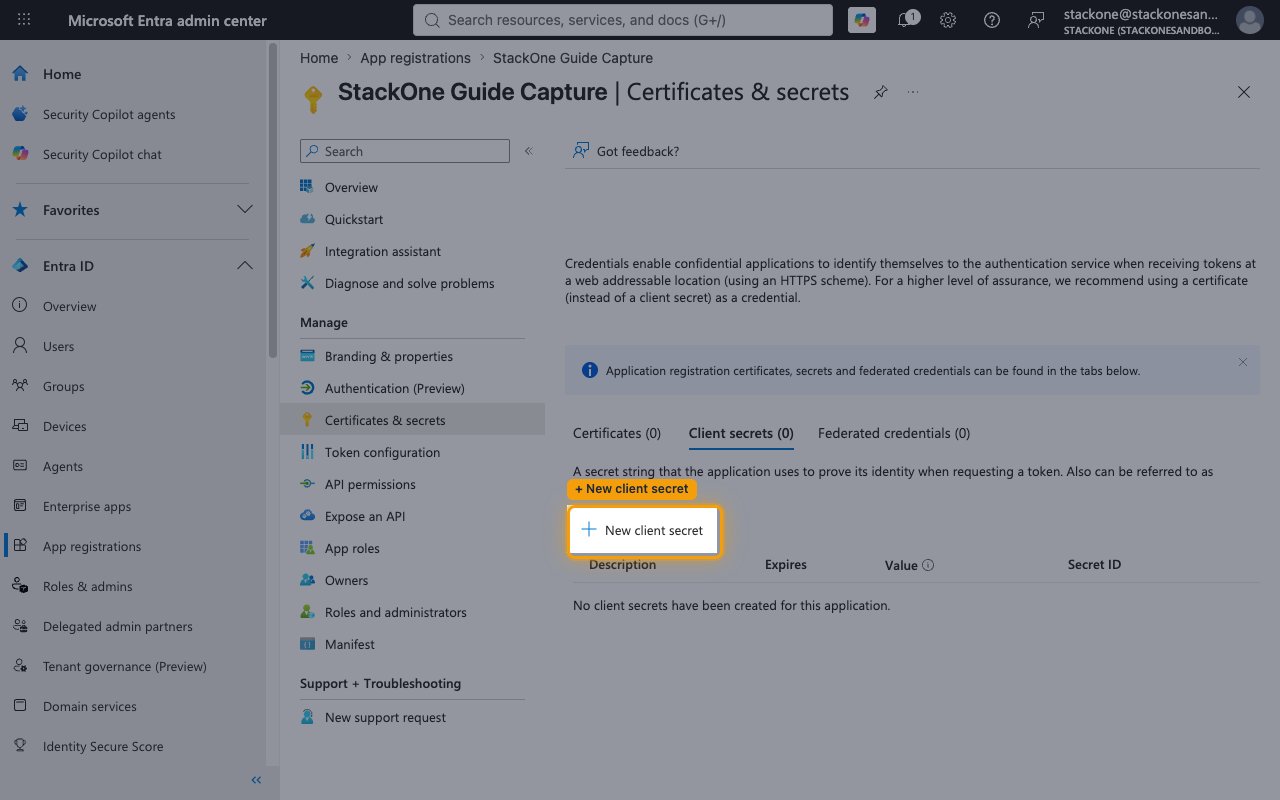
        <p>In the left menu under <strong>Manage</strong>, click <strong>Certificates & secrets</strong>. On the <strong>Client secrets</strong> tab, click <strong>+ New client secret</strong>.</p>

        <img src="https://mintcdn.com/stackone-60/4cMWTegrJozhojrD/connectors/bingads/images/oauth2-setup-new-client-secret.png?fit=max&auto=format&n=4cMWTegrJozhojrD&q=85&s=1cd38592976f5eb0552562bdd7766c86" alt="Certificates and secrets page on the Client secrets tab with the New client secret button highlighted" width="1280" height="800" data-path="connectors/bingads/images/oauth2-setup-new-client-secret.png" />
      </div>
    </Step>

    <Step title="Add the client secret">
      <div data-guide-step data-guide-scopes="" data-guide-display-scopes-list="">
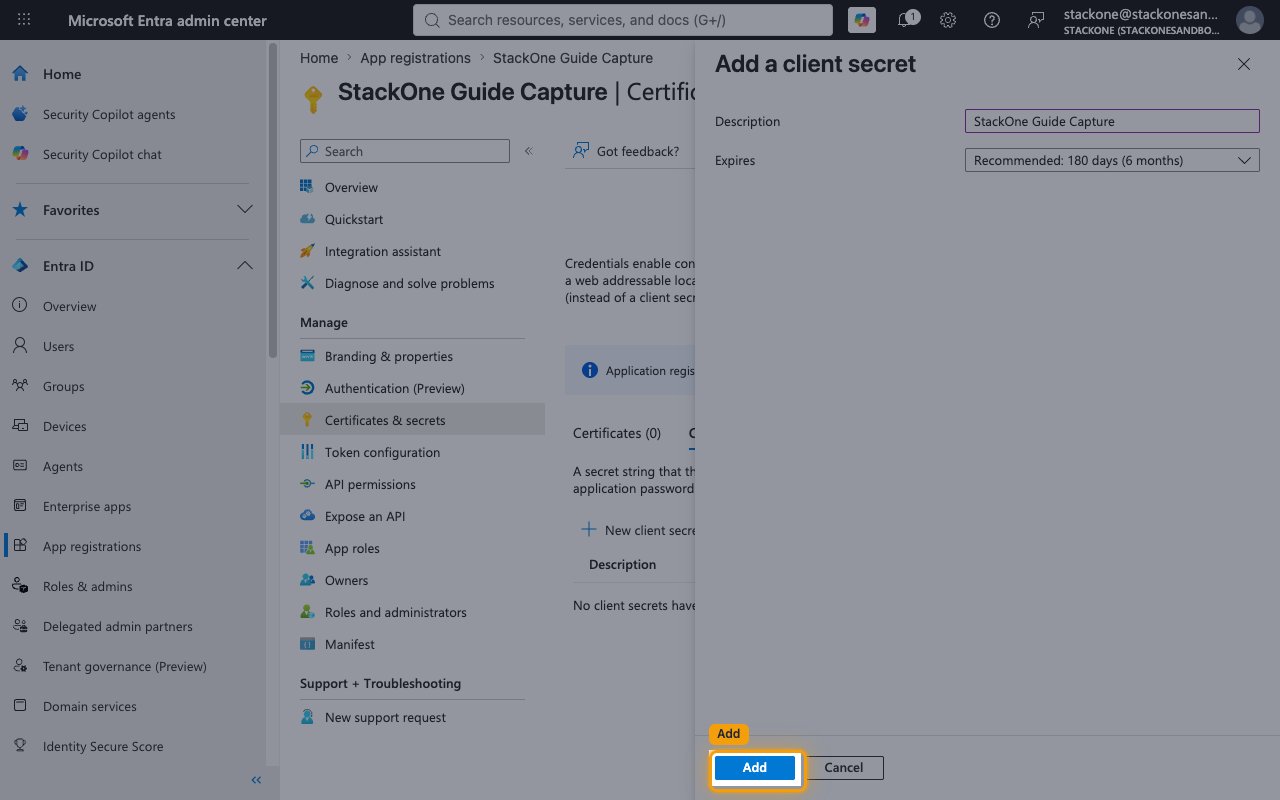
        <p>In the <strong>Add a client secret</strong> panel, enter a <strong>Description</strong>, choose an expiry under <strong>Expires</strong> (default <strong>Recommended: 180 days (6 months)</strong>), and click <strong>Add</strong>.</p>

        <ul>
          <li>Track the expiry date — the connection stops working when the secret expires and you will need to create a new one.</li>
        </ul>

        <img src="https://mintcdn.com/stackone-60/4cMWTegrJozhojrD/connectors/bingads/images/oauth2-setup-add-client-secret.png?fit=max&auto=format&n=4cMWTegrJozhojrD&q=85&s=1033b269e18dbd8d57d09ee617f856a0" alt="Add a client secret panel with Description and Expires fields and the Add button highlighted" width="1280" height="800" data-path="connectors/bingads/images/oauth2-setup-add-client-secret.png" />
      </div>
    </Step>

    <Step title="Copy the secret Value">
      <div data-guide-step data-guide-scopes="" data-guide-display-scopes-list="">
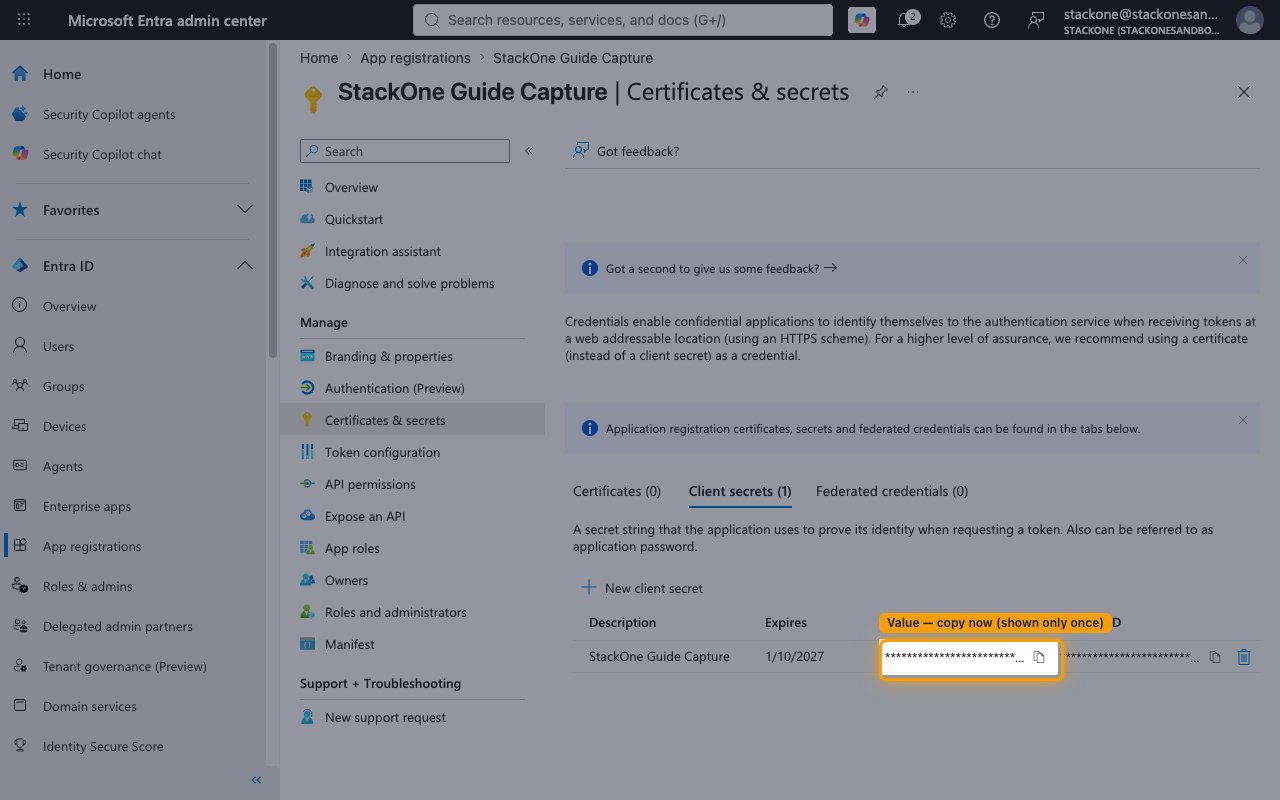
        <p>Copy the new secret's <strong>Value</strong> column (not the <strong>Secret ID</strong>) and paste it into the <strong>Client Secret</strong> field in the StackOne Connector profile.</p>

        <ul>
          <li>The secret <strong>Value</strong> is only displayed once and cannot be retrieved later — copy it before leaving the page.</li>
        </ul>

        <img src="https://mintcdn.com/stackone-60/4cMWTegrJozhojrD/connectors/bingads/images/oauth2-setup-secret-value.png?fit=max&auto=format&n=4cMWTegrJozhojrD&q=85&s=9cf03abfe86d52b5c71d4878671892b9" alt="Client secrets tab with the one-time secret Value highlighted and redacted" width="1280" height="800" data-path="connectors/bingads/images/oauth2-setup-secret-value.png" />
      </div>
    </Step>

    <Step title="Set the Scopes field (optional)">
      <div data-guide-step data-guide-scopes="https://ads.microsoft.com/msads.manage,offline_access" data-guide-display-scopes-list="https://ads.microsoft.com/msads.manage,offline_access">
        <div className="connector-guide-actions-badge" data-guide-actions-badge data-guide-actions-badge-scopes="https://ads.microsoft.com/msads.manage,offline_access" style={{ display: 'block', width: 'fit-content', maxWidth: '100%', padding: '2px 8px', borderRadius: '8px', fontSize: '12px', marginBottom: '8px', marginTop: '-10px', whiteSpace: 'nowrap', overflowX: 'auto', overflowY: 'hidden', msOverflowStyle: 'none', scrollbarWidth: 'none' }}>
          <span>Enables actions: </span><span data-guide-actions-badge-labels>Add Account, Add Ad Groups, Add Ads, Add Audiences, Add Budgets, Add Campaigns, Add Conversion Goals, Add Keywords, Add Uet Tags, Delete Account, Delete Ad Groups, Delete Ads, Delete Audiences, Delete Budgets, Delete Campaigns, Delete Keywords, Delete User, Find Accounts, Find Accounts Or Customers Info, Get Account, Get Ad Groups By Campaign Id, Get Ad Groups By Ids, Get Ads By Ad Group Id, Get Ads By Editorial Status, Get Ads By Ids, Get Audiences By Ids, Get Budgets By Ids, Get Bulk Upload Status, Get Bulk Upload Url, Get Campaigns By Account Id, Get Campaigns By Ids, Get Conversion Goals By Ids, Get Conversion Goals By Tag Ids, Get Customer, Get Historical Search Count, Get Keywords By Ad Group Id, Get Keywords By Editorial Status, Get Keywords By Ids, Get Uet Tags By Ids, Get User, Get Users Info, Search Accounts, Search Client Links, Search Companies, Search Coupons, Search Customers, Search Insertion Orders, Search User Invitations, Send User Invitation, Update Account, Update Ad Groups, Update Ads, Update Audiences, Update Budgets, Update Campaigns, Update Conversion Goals, Update Customer, Update Keywords, Update Uet Tags, Update User</span>
        </div>

        <p>The <strong>Scopes</strong> field in the StackOne Connector profile is a space-separated list of OAuth scopes to request. Leave it blank to use the default — no extra API permissions need to be added in Azure, because Microsoft Advertising consent is requested at connect time.</p>

        <ul>
          <li>Default: `https://ads.microsoft.com/msads.manage offline_access`</li>
        </ul>

        <div style={{ marginTop: '8px' }} data-guide-display-scopes>
          <div className="connector-guide-scopes-container">
            <ul className="not-prose" style={{ listStyleType: "'- '", paddingLeft: '1em', margin: 0 }}>
              <li style={{ overflowWrap: 'anywhere', wordBreak: 'break-word' }} data-guide-display-scope="https://ads.microsoft.com/msads.manage">
                <button type="button" className="connector-guide-scope-copy" aria-label="Copy https://ads.microsoft.com/msads.manage" title="Copy scope" data-copy="https://ads.microsoft.com/msads.manage">
                  <span className="connector-guide-scope-copy__label">[https://ads.microsoft.com/msads.manage](https://ads.microsoft.com/msads.manage)</span>
                  <span className="connector-guide-scope-copy__icon" aria-hidden="true">⧉</span>
                </button>
              </li>

              <li style={{ overflowWrap: 'anywhere', wordBreak: 'break-word' }} data-guide-display-scope="offline_access">
                <button type="button" className="connector-guide-scope-copy" aria-label="Copy offline_access" title="Copy scope" data-copy="offline_access">
                  <span className="connector-guide-scope-copy__label">offline\_access</span>
                  <span className="connector-guide-scope-copy__icon" aria-hidden="true">⧉</span>
                </button>
              </li>
            </ul>
          </div>
        </div>
      </div>
    </Step>
  </Steps>
</section>

## Creating the StackOne Connector Profile

To create the Connector Profile in StackOne for <strong>Bing Ads (Microsoft Ads)</strong>:

<Steps>
  <Step title="Navigate to Connector Profiles">
    Login to StackOne and navigate to [Connector Profiles](https://app.stackone.com/connector_profiles)
  </Step>

  <Step title="Create New Connector Profile">
    <ul>
      <li>Click <strong>+ Connector Profile</strong></li>
      <li>Search for and select <strong>Bing Ads (Microsoft Ads)</strong></li>
      <li>Select <strong>Type</strong> as <strong>OAuth 2.0</strong></li>

      <li>
        Fill out the fields using details retrieved from your provider:

        <ul style={{ marginLeft: '20px' }}>
          <li><strong>Client ID</strong></li>
          <li><strong>Client Secret</strong></li>
          <li><strong>Scopes</strong> (Optional)</li>
        </ul>
      </li>

      <li>(Optional) Select <strong>Actions</strong> to be enabled for this Connector Profile</li>
      <li>Click <strong>Create profile</strong></li>
    </ul>
  </Step>
</Steps>

Congratulations! The new Connector Profile will now show up in your project ready to be used. You can now continue to <a href="/guides/accounts-section#linking-accounts">Link Accounts</a> for <strong>Bing Ads (Microsoft Ads)</strong>.