> ## Documentation Index
> Fetch the complete documentation index at: https://docs.stackone.com/llms.txt
> Use this file to discover all available pages before exploring further.

# Autumn Webhook Setup Guide

> Configure Autumn to deliver events to StackOne.

## Prerequisites

The connector should already be set up, with a Connector Profile and a Linked Account. See [Getting Started](/connectors/autumn#getting-started) on the Autumn connector page.

<section data-guide-section data-guide-scopes="">
  <h2>Set up Autumn webhooks</h2>

  <p>Autumn delivers events through Svix. Register StackOne's Native Webhook URL as an endpoint in the Autumn dashboard and choose which events to send. Only the events you select are delivered.</p>

  <Steps>
    <Step title="Copy the Native Webhook URL from StackOne">
      <div data-guide-step data-guide-scopes="" data-guide-display-scopes-list="">
        <p>In StackOne Hub, open the connected Autumn account and copy the <strong>Native Webhook URL</strong>. This URL is unique to the account and already includes the security token that routes events to it — no signing secret configuration is required.</p>
      </div>
    </Step>

    <Step title="Open Webhooks and add an endpoint">
      <div data-guide-step data-guide-scopes="" data-guide-display-scopes-list="">
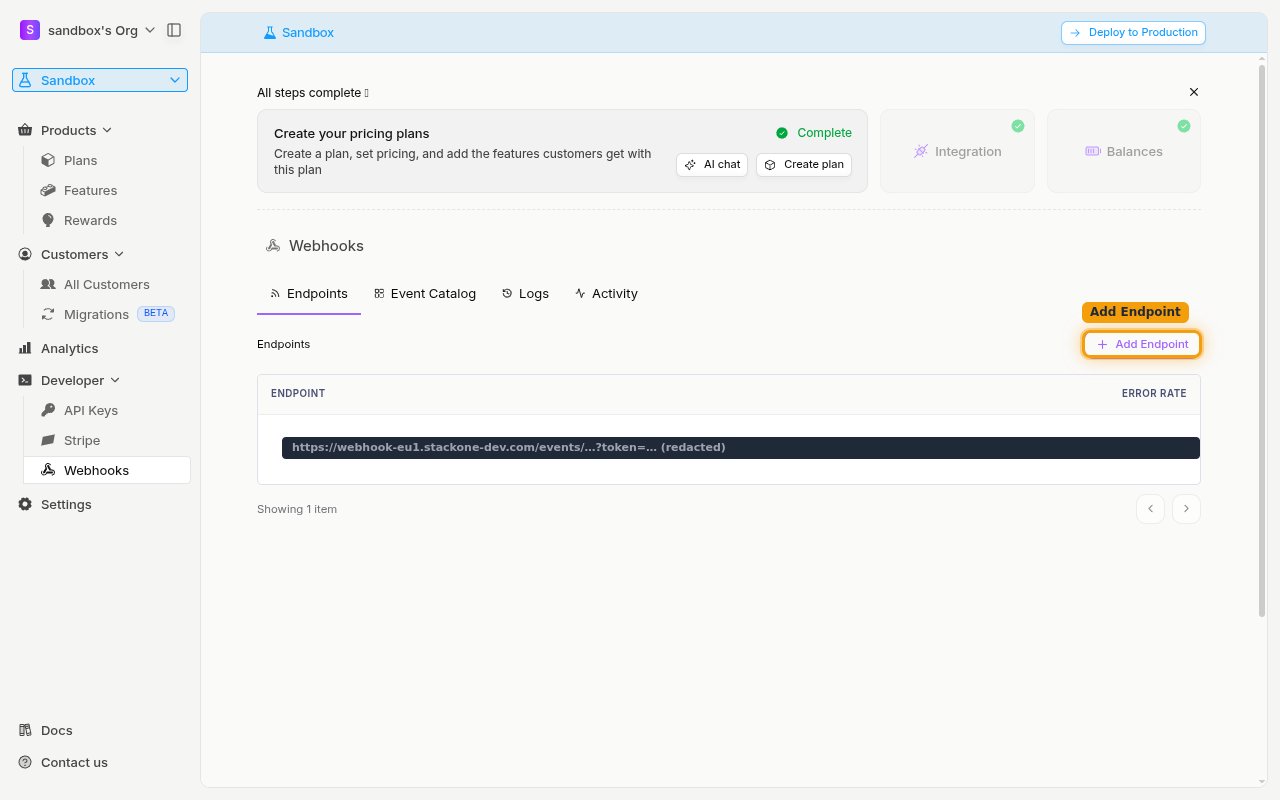
        <p>In the Autumn dashboard sidebar, open <strong>Developer</strong> and select <strong>Webhooks</strong>. On the <strong>Endpoints</strong> tab, click <strong>Add Endpoint</strong>.</p>

        <img src="https://mintcdn.com/stackone-60/TkOBauAZ4BEKk3cx/connectors/autumn/images/events-add-endpoint.png?fit=max&auto=format&n=TkOBauAZ4BEKk3cx&q=85&s=2f5ce90661f603a8a71afcd5c00860b0" alt="The Developer Webhooks page with the Endpoints tab and the Add Endpoint button" width="1280" height="800" data-path="connectors/autumn/images/events-add-endpoint.png" />
      </div>
    </Step>

    <Step title="Paste the URL and subscribe to events">
      <div data-guide-step data-guide-scopes="" data-guide-display-scopes-list="">
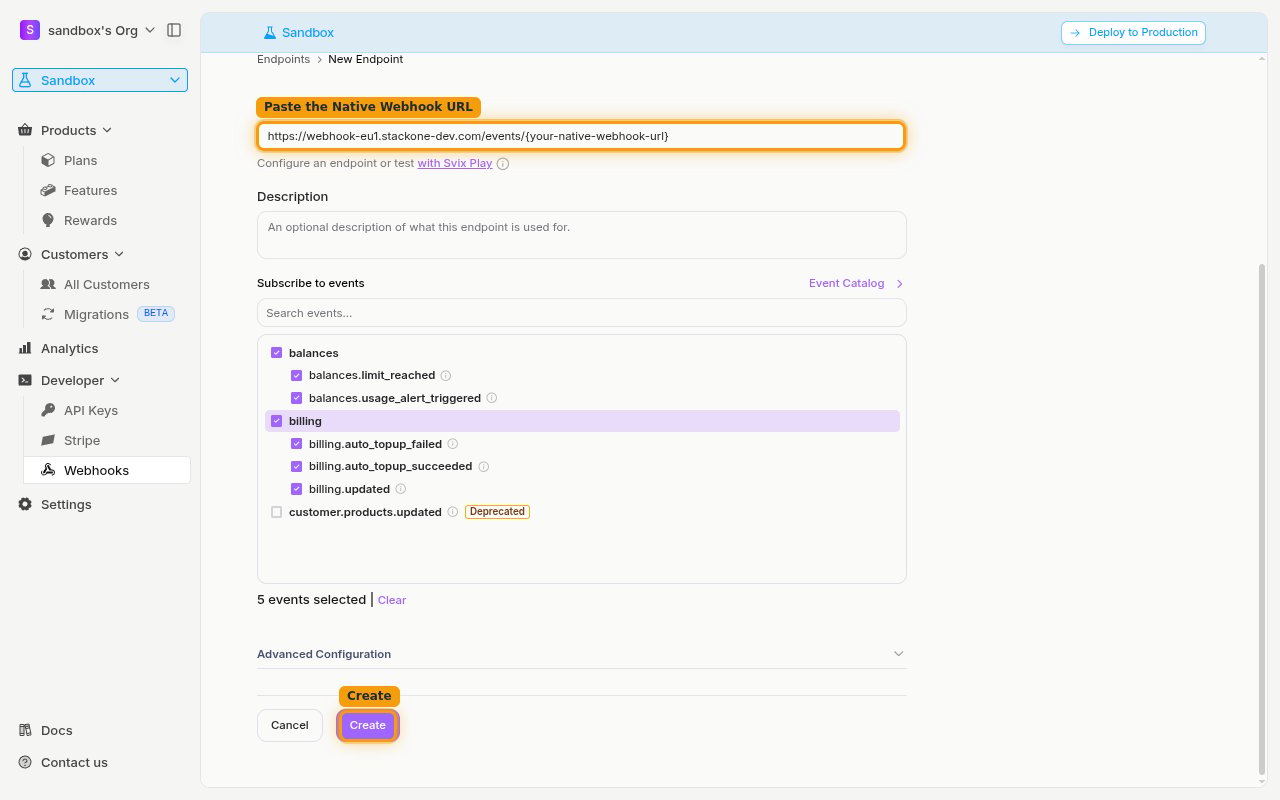
        <p>In the <strong>Endpoint URL</strong> field, paste the Native Webhook URL you copied from StackOne. Under <strong>Subscribe to events</strong>, tick the events you want to receive — enable the <strong>balances</strong> and <strong>billing</strong> groups to cover every supported event. Leave <strong>customer.products.updated</strong> unchecked, as it is marked <strong>Deprecated</strong>. Then click <strong>Create</strong>.</p>

        <ul>
          <li>Only events you select are delivered — Autumn will not send events you have not subscribed to.</li>
          <li>You can use the <strong>Send Test Event</strong> option on the created endpoint to confirm StackOne is receiving events.</li>
        </ul>

        <img src="https://mintcdn.com/stackone-60/TkOBauAZ4BEKk3cx/connectors/autumn/images/events-configure-endpoint.png?fit=max&auto=format&n=TkOBauAZ4BEKk3cx&q=85&s=74e1ac2e5bec2b545ab4ea26c1a0e0b6" alt="The New Endpoint form with the Endpoint URL field, the balances and billing events selected, and the Create button" width="1280" height="800" data-path="connectors/autumn/images/events-configure-endpoint.png" />
      </div>
    </Step>
  </Steps>
</section>

<section data-guide-section data-guide-scopes="">
  <h2>Available webhook events</h2>

  <p>The following Autumn events can be enabled. Only events selected on the endpoint are included in the subscription — Autumn will not deliver events that are not subscribed.</p>

  <Steps>
    <Step title="Balance events">
      <div data-guide-step data-guide-scopes="" data-guide-display-scopes-list="">
        <p>Events related to feature balances and usage.</p>

        <ul>
          <li><strong>Limit Reached</strong> (`balances.limit_reached`) — Fired when a customer reaches the limit for a feature (included allowance, max purchase, spend limit, or a usage-limit billing control)</li>
          <li><strong>Usage Alert Triggered</strong> (`balances.usage_alert_triggered`) — Fired when a customer crosses a configured usage-alert threshold</li>
        </ul>
      </div>
    </Step>

    <Step title="Billing events">
      <div data-guide-step data-guide-scopes="" data-guide-display-scopes-list="">
        <p>Events related to plans and automatic prepaid top-ups.</p>

        <ul>
          <li><strong>Auto Top-Up Failed</strong> (`billing.auto_topup_failed`) — Fired when an automatic prepaid top-up is blocked, declined, or fails before granting additional balance</li>
          <li><strong>Auto Top-Up Succeeded</strong> (`billing.auto_topup_succeeded`) — Fired when an automatic prepaid top-up grants additional prepaid balance</li>
          <li><strong>Plans Updated</strong> (`billing.updated`) — Fired when a customer's plans are activated, scheduled, updated, or expired</li>
        </ul>
      </div>
    </Step>
  </Steps>
</section>

<section data-guide-section data-guide-scopes="">
  <h2>Delivery format</h2>

  <p>How Autumn delivers events to StackOne.</p>

  <Steps>
    <Step title="Svix delivery and retries">
      <div data-guide-step data-guide-scopes="" data-guide-display-scopes-list="">
        <p>Autumn delivers events through Svix as a single event per request, with a JSON body of the form `{ "type": "<event>", "data": { ... } }`. Each request includes `svix-id`, `svix-timestamp`, and `svix-signature` headers. If an endpoint returns an error or is unavailable, Autumn automatically retries delivery with exponential backoff.</p>
      </div>
    </Step>
  </Steps>
</section>

## Verify

Your Connector should now be able to receive and process events. Try triggering an event and you should see an Event appear in the Connector logs.