> ## Documentation Index
> Fetch the complete documentation index at: https://docs.stackone.com/llms.txt
> Use this file to discover all available pages before exploring further.

# Anthropic Webhook Setup Guide

> Configure Anthropic to deliver events to StackOne.

## Prerequisites

The connector should already be set up, with a Connector Profile and a Linked Account. See [Getting Started](/connectors/anthropic#getting-started) on the Anthropic connector page.

<section data-guide-section data-guide-scopes="">
  <h2>Create the webhook endpoint</h2>

  <p>Anthropic delivers events to a webhook endpoint you register in the Claude Console. There is no API for creating one, so this is done by hand. Endpoints belong to a workspace and receive events from that workspace only.</p>

  <Steps>
    <Step title="Retrieve your StackOne Native Webhook URL">
      <div data-guide-step data-guide-scopes="" data-guide-display-scopes-list="">
        <p>The <strong>Native Webhook URL</strong> is generated once an account has been linked. You will paste it into the Console in a later step.</p>

        <ul>
          <li>Open the linked account in StackOne.</li>
          <li>Copy the value from <strong>Native Webhook URL</strong>.</li>
        </ul>
      </div>
    </Step>

    <Step title="Open the Webhooks page">
      <div data-guide-step data-guide-scopes="" data-guide-display-scopes-list="">
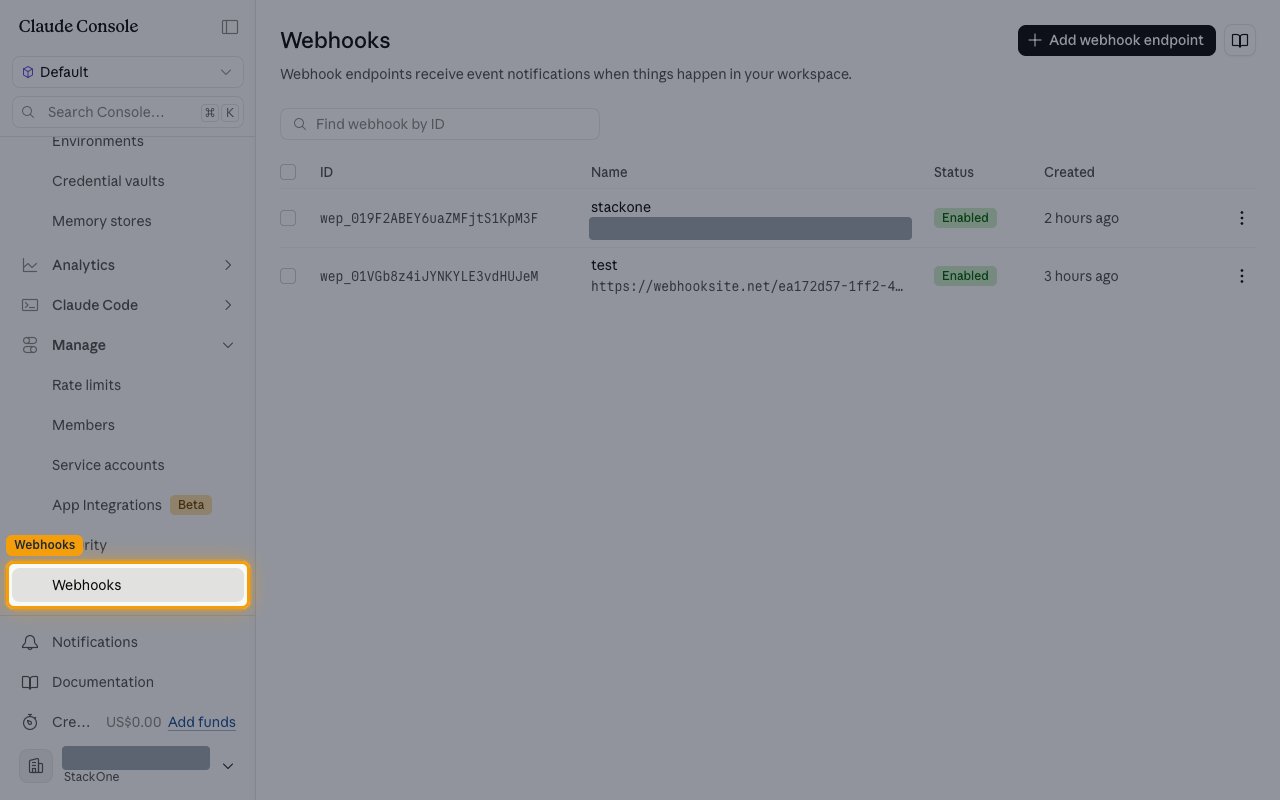
        <p>Sign in to the <a href="https://platform.claude.com" target="_blank" rel="noopener noreferrer">Claude Console</a>, select the workspace whose events you want, then click <strong>Webhooks</strong> under <strong>Manage</strong> in the sidebar. The page lists existing endpoints by <strong>ID</strong>, <strong>Name</strong>, <strong>Status</strong> and <strong>Created</strong>.</p>

        <ul>
          <li>Pick the workspace deliberately — an endpoint receives events from its own workspace only, so it must be the workspace your agents, sessions and deployments run in.</li>
        </ul>

        <img src="https://mintcdn.com/stackone-60/phoYcUXBGuzwx8FK/connectors/anthropic/images/events-open-webhooks.png?fit=max&auto=format&n=phoYcUXBGuzwx8FK&q=85&s=f1b922607a12f210c3f439449b5a9a33" alt="The Claude Console Webhooks page with the Webhooks entry under Manage highlighted in the sidebar." width="1280" height="800" data-path="connectors/anthropic/images/events-open-webhooks.png" />
      </div>
    </Step>

    <Step title="Add an endpoint">
      <div data-guide-step data-guide-scopes="" data-guide-display-scopes-list="">
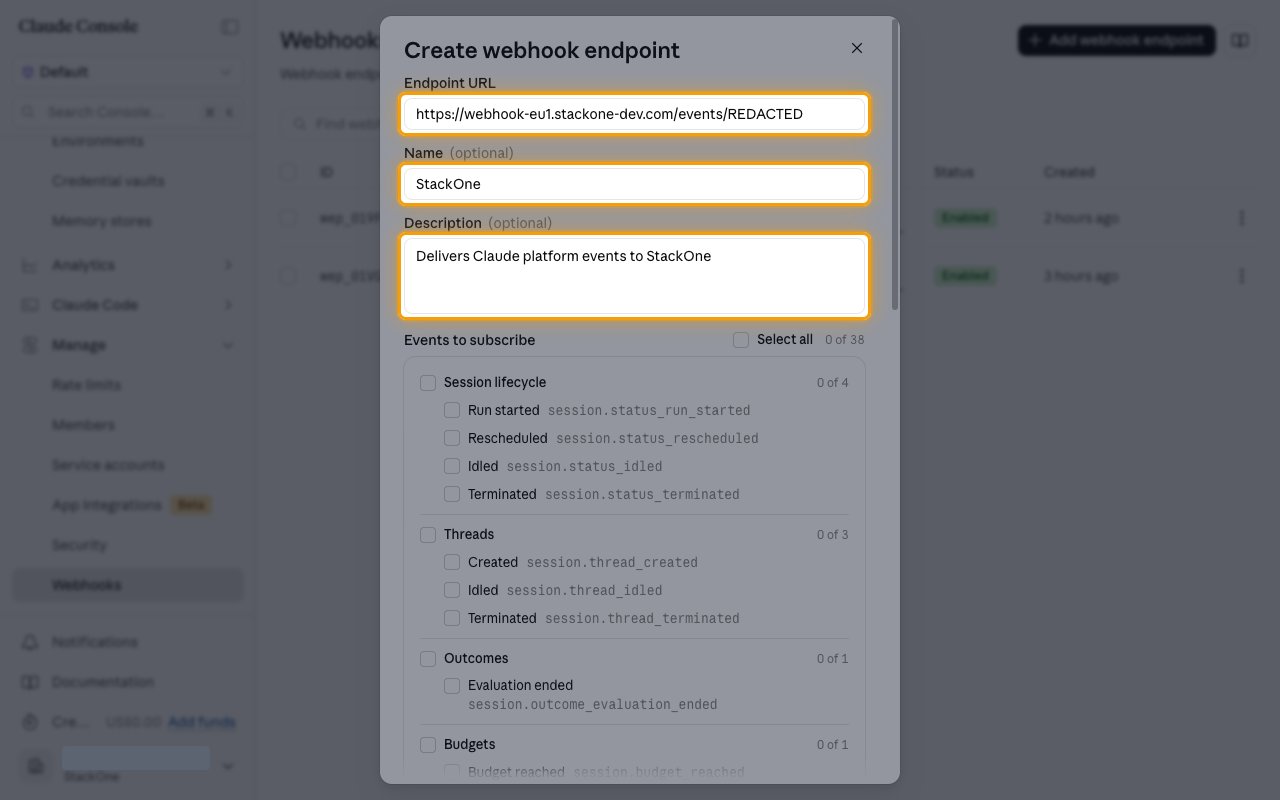
        <p>Click <strong>Add webhook endpoint</strong>. In the <strong>Create webhook endpoint</strong> dialog, paste your <strong>Native Webhook URL</strong> into <strong>Endpoint URL</strong>. <strong>Name</strong> and <strong>Description</strong> are optional — a name such as `StackOne` makes the endpoint easy to recognise later.</p>

        <ul>
          <li>The URL must be HTTPS on port 443 with a publicly resolvable hostname.</li>
        </ul>

        <img src="https://mintcdn.com/stackone-60/phoYcUXBGuzwx8FK/connectors/anthropic/images/events-create-endpoint.png?fit=max&auto=format&n=phoYcUXBGuzwx8FK&q=85&s=aba84efc3b34953e7d88406812a27b77" alt="The Create webhook endpoint dialog with the Endpoint URL, Name and Description fields highlighted." width="1280" height="800" data-path="connectors/anthropic/images/events-create-endpoint.png" />
      </div>
    </Step>

    <Step title="Subscribe to the events">
      <div data-guide-step data-guide-scopes="" data-guide-display-scopes-list="">
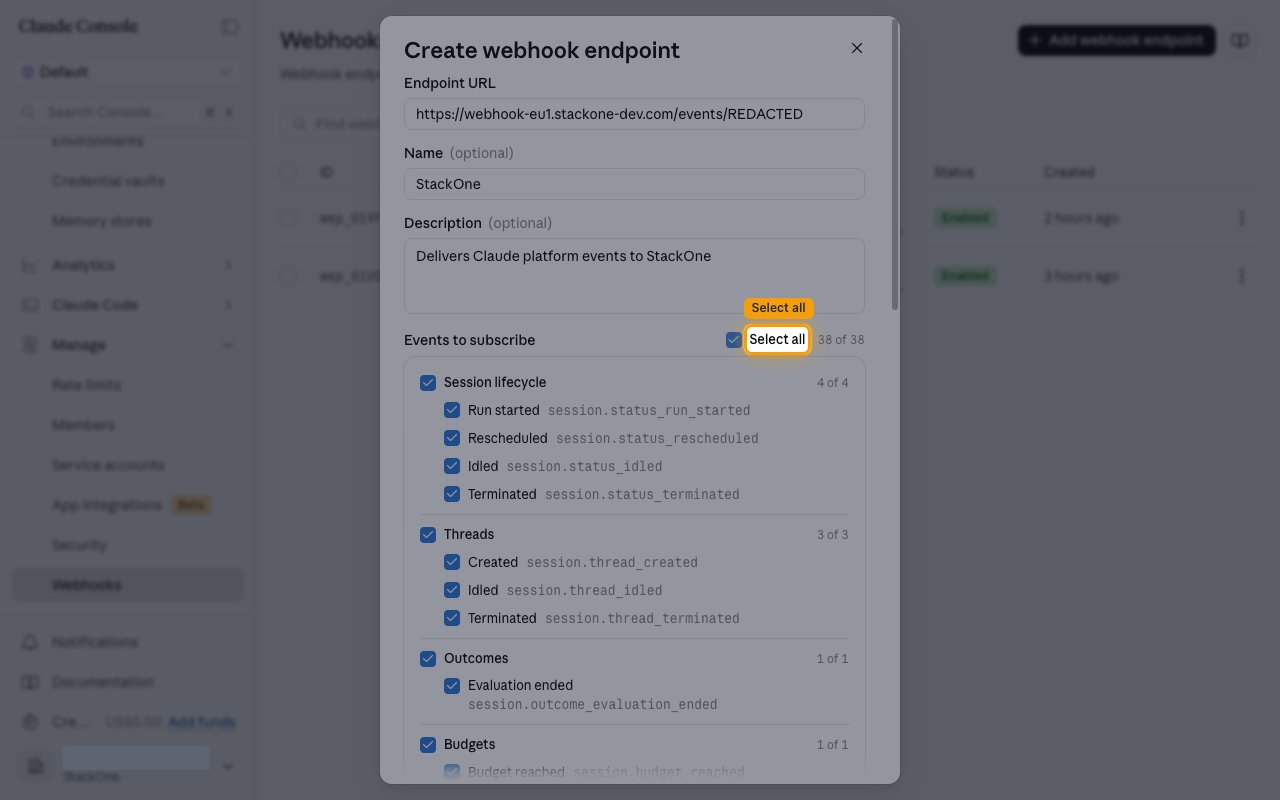
        <p>Under <strong>Events to subscribe</strong>, tick the events you want delivered. Click <strong>Select all</strong> to subscribe to all 38 at once, or tick a group header to take that group.</p>

        <ul>
          <li>The counter beside <strong>Select all</strong> shows how many of the 38 are selected, and each group shows its own count.</li>
          <li>Events are grouped as <strong>Session lifecycle</strong>, <strong>Threads</strong>, <strong>Outcomes</strong>, <strong>Budgets</strong>, <strong>Session record</strong>, <strong>Vault lifecycle</strong>, <strong>Credential lifecycle</strong>, <strong>Agent lifecycle</strong>, <strong>Deployment lifecycle</strong>, <strong>Deployment runs</strong>, <strong>Environment lifecycle</strong> and <strong>Memory store lifecycle</strong>.</li>
        </ul>

        <img src="https://mintcdn.com/stackone-60/phoYcUXBGuzwx8FK/connectors/anthropic/images/events-select-events.png?fit=max&auto=format&n=phoYcUXBGuzwx8FK&q=85&s=aed36be9f597590e7a080d753b2a1d08" alt="The Events to subscribe section with Select all highlighted and all 38 events ticked across every group." width="1280" height="800" data-path="connectors/anthropic/images/events-select-events.png" />
      </div>
    </Step>

    <Step title="Save the signing secret">
      <div data-guide-step data-guide-scopes="" data-guide-display-scopes-list="">
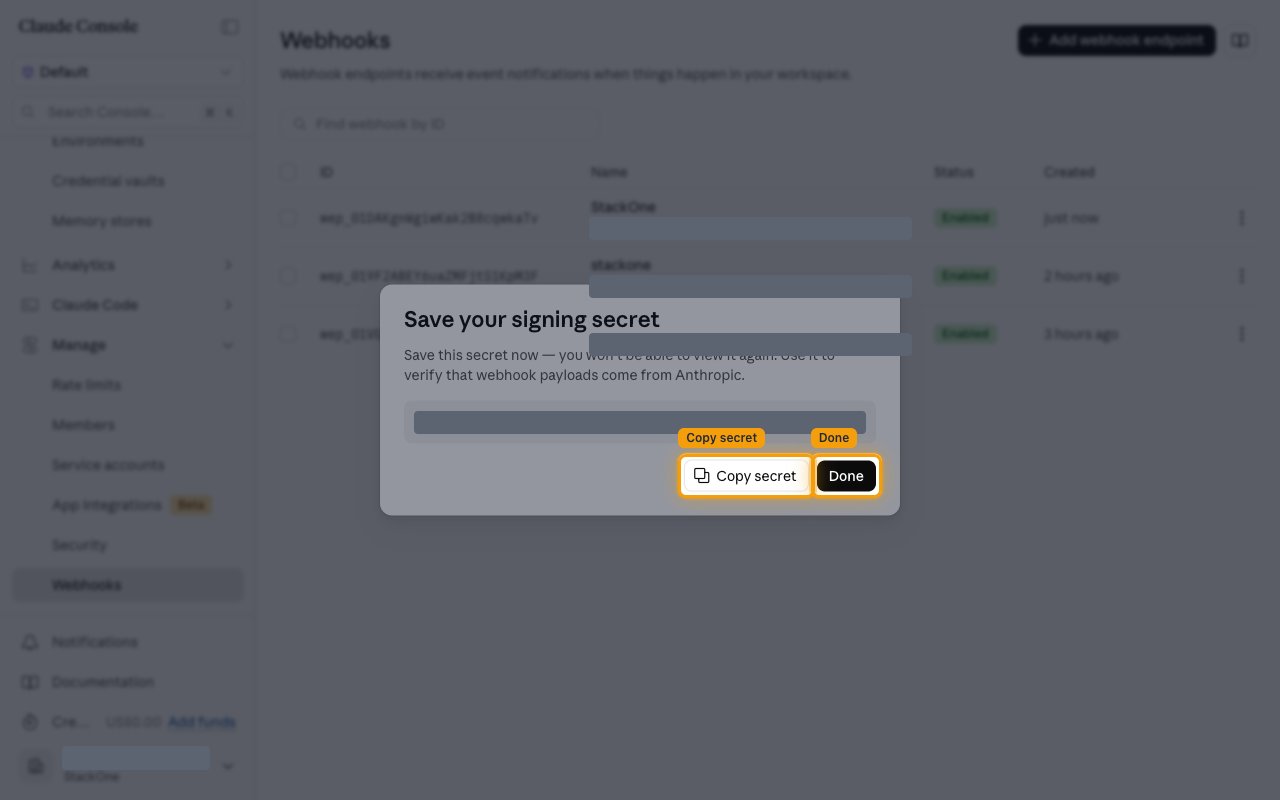
        <p>Click <strong>Create webhook endpoint</strong>. The <strong>Save your signing secret</strong> dialog shows a `whsec_`-prefixed secret. Click <strong>Copy secret</strong>, store it somewhere safe, then click <strong>Done</strong>.</p>

        <ul>
          <li>The secret is shown once and cannot be viewed again. If you lose it, use <strong>Regenerate signing secret</strong> on the endpoint to issue a new one.</li>
          <li>StackOne does not need this secret. It authenticates each delivery using the token already in the <strong>Native Webhook URL</strong>.</li>
        </ul>

        <img src="https://mintcdn.com/stackone-60/phoYcUXBGuzwx8FK/connectors/anthropic/images/events-signing-secret.png?fit=max&auto=format&n=phoYcUXBGuzwx8FK&q=85&s=0c2f31448a454eb12eba78e4a8ba322a" alt="The Save your signing secret dialog with the Copy secret and Done buttons highlighted and the secret value masked." width="1280" height="800" data-path="connectors/anthropic/images/events-signing-secret.png" />
      </div>
    </Step>
  </Steps>
</section>

<section data-guide-section data-guide-scopes="">
  <h2>Confirm the endpoint is receiving events</h2>

  <p>Check the endpoint is enabled and subscribed to what you expect before relying on live events.</p>

  <Steps>
    <Step title="Check the endpoint is enabled">
      <div data-guide-step data-guide-scopes="" data-guide-display-scopes-list="">
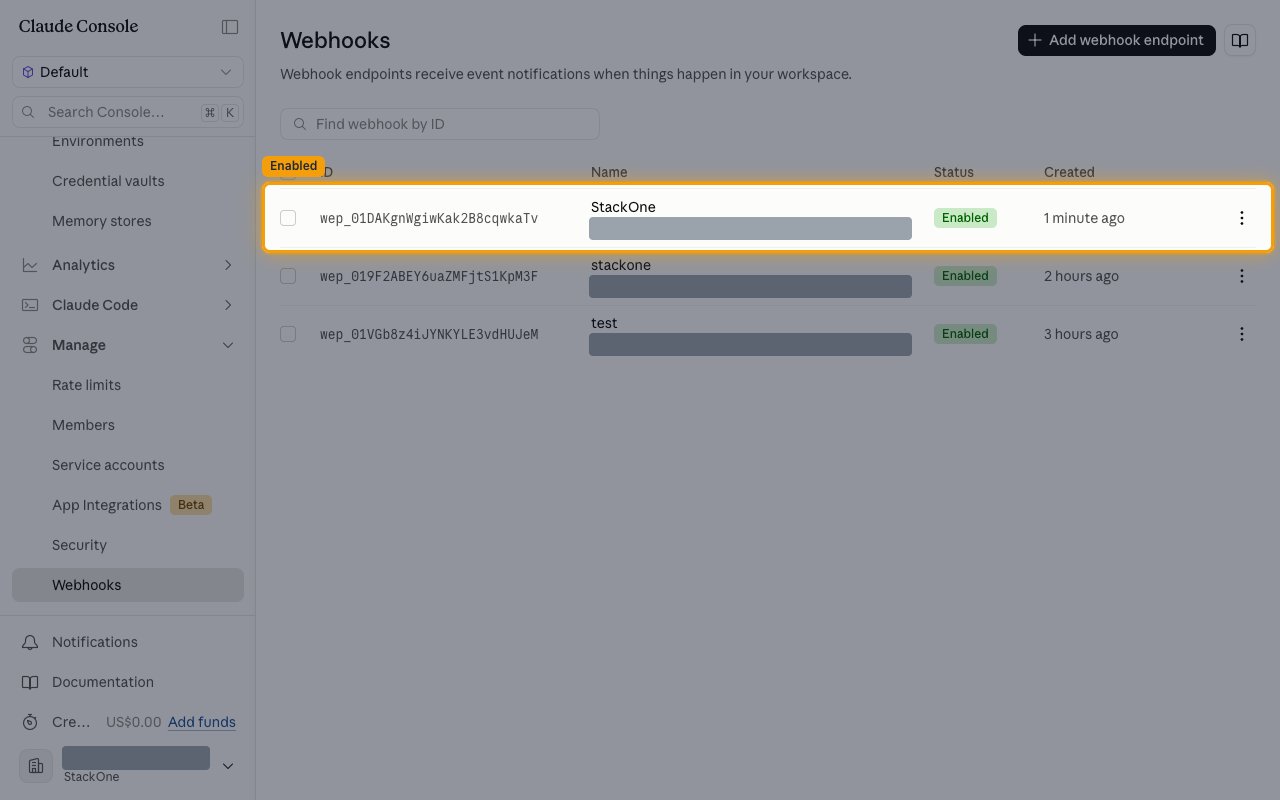
        <p>The endpoint now appears in the list with an <strong>Enabled</strong> status. Click it to open its details.</p>

        <img src="https://mintcdn.com/stackone-60/phoYcUXBGuzwx8FK/connectors/anthropic/images/events-endpoint-list.png?fit=max&auto=format&n=phoYcUXBGuzwx8FK&q=85&s=09213772ee39cfd046913a127c47195a" alt="The Webhooks list showing the new endpoint with an Enabled status, its destination URL masked." width="1280" height="800" data-path="connectors/anthropic/images/events-endpoint-list.png" />
      </div>
    </Step>

    <Step title="Review the subscribed events">
      <div data-guide-step data-guide-scopes="" data-guide-display-scopes-list="">
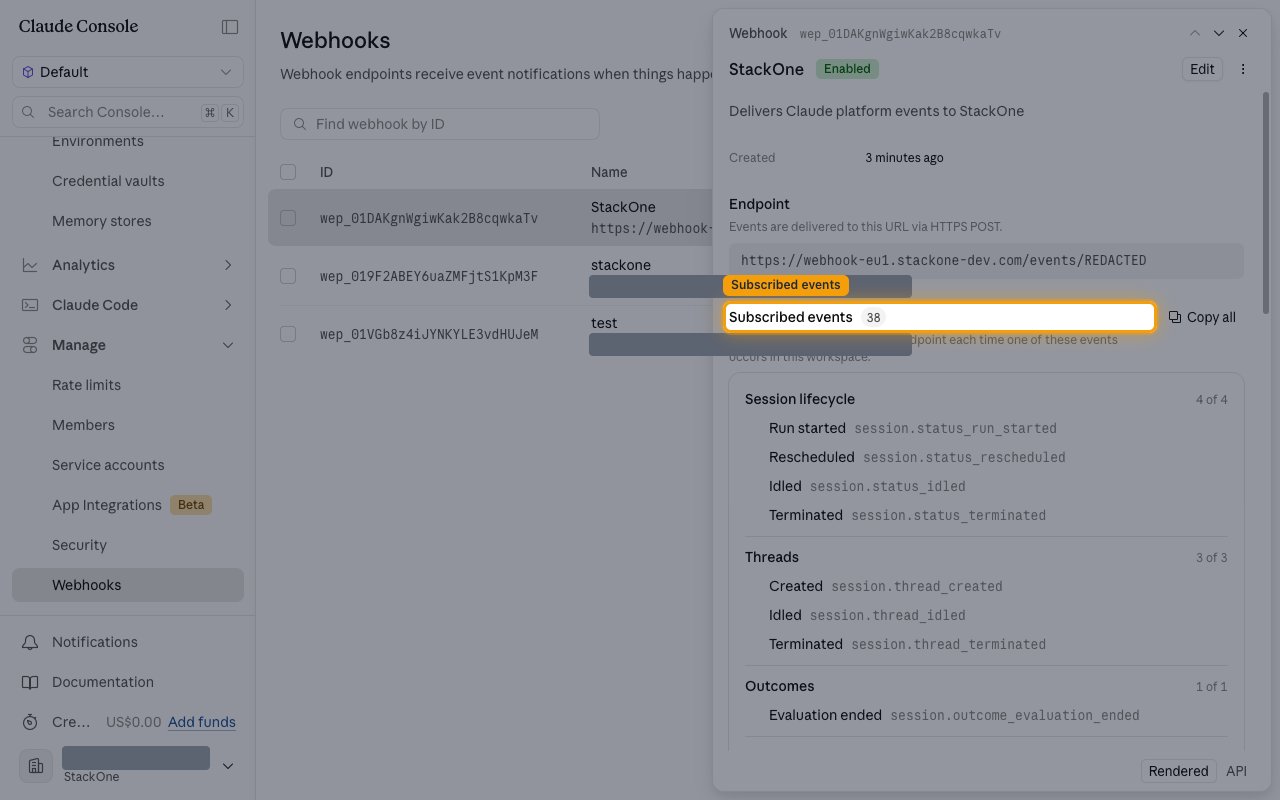
        <p>The detail panel shows the <strong>Endpoint</strong> URL, when it was <strong>Created</strong>, and <strong>Subscribed events</strong> with the count and the full list by group. <strong>More actions</strong> holds <strong>Disable</strong>, <strong>Regenerate signing secret</strong> and <strong>Delete</strong>.</p>

        <ul>
          <li><strong>Edit</strong> changes the URL or the subscription. If your endpoint moves, update the URL here rather than redirecting to the new one.</li>
        </ul>

        <img src="https://mintcdn.com/stackone-60/phoYcUXBGuzwx8FK/connectors/anthropic/images/events-endpoint-detail.png?fit=max&auto=format&n=phoYcUXBGuzwx8FK&q=85&s=03e51b44de17724d74e4ae37bd9e13af" alt="The endpoint detail panel with Subscribed events highlighted, showing 38 events grouped by resource." width="1280" height="800" data-path="connectors/anthropic/images/events-endpoint-detail.png" />
      </div>
    </Step>
  </Steps>
</section>

<section data-guide-section data-guide-scopes="">
  <h2>Available webhook events</h2>

  <p>The Console groups the 38 event types as below. Only events subscribed on the endpoint are delivered, and a subscription added later does not backfill events already emitted.</p>

  <Steps>
    <Step title="Subscribe to session lifecycle events">
      <div data-guide-step data-guide-scopes="" data-guide-display-scopes-list="">
        <p>Events covering a session's run state.</p>

        <ul>
          <li><strong>Run started</strong> (`session.status_run_started`) — Fired when a session starts running and begins work.</li>
          <li><strong>Rescheduled</strong> (`session.status_rescheduled`) — Fired when a session is rescheduled to run at a different time.</li>
          <li><strong>Idled</strong> (`session.status_idled`) — Fired when a session stops working and becomes idle.</li>
          <li><strong>Terminated</strong> (`session.status_terminated`) — Fired when a session is terminated and will do no further work.</li>
        </ul>
      </div>
    </Step>

    <Step title="Subscribe to thread, outcome and budget events">
      <div data-guide-step data-guide-scopes="" data-guide-display-scopes-list="">
        <p>Events covering threads within a session, its outcome evaluation and its budget.</p>

        <ul>
          <li><strong>Created</strong> (`session.thread_created`) — Fired when a new thread is created within a session.</li>
          <li><strong>Idled</strong> (`session.thread_idled`) — Fired when a thread within a session becomes idle.</li>
          <li><strong>Terminated</strong> (`session.thread_terminated`) — Fired when a thread within a session is terminated.</li>
          <li><strong>Evaluation ended</strong> (`session.outcome_evaluation_ended`) — Fired when the outcome evaluation for a session completes.</li>
          <li><strong>Budget reached</strong> (`session.budget_reached`) — Fired when a session reaches the budget allocated to it.</li>
        </ul>
      </div>
    </Step>

    <Step title="Subscribe to session record events">
      <div data-guide-step data-guide-scopes="" data-guide-display-scopes-list="">
        <p>Events covering changes to the session record itself.</p>

        <ul>
          <li><strong>Updated</strong> (`session.updated`) — Fired when a session's configuration or metadata changes.</li>
          <li><strong>Deleted</strong> (`session.deleted`) — Fired when a session is deleted.</li>
        </ul>
      </div>
    </Step>

    <Step title="Subscribe to vault and credential events">
      <div data-guide-step data-guide-scopes="" data-guide-display-scopes-list="">
        <p>Events covering credential vaults and the credentials inside them.</p>

        <ul>
          <li><strong>Created</strong> (`vault.created`) — Fired when a vault is created.</li>
          <li><strong>Archived</strong> (`vault.archived`) — Fired when a vault is archived.</li>
          <li><strong>Deleted</strong> (`vault.deleted`) — Fired when a vault is deleted.</li>
          <li><strong>Created</strong> (`vault_credential.created`) — Fired when a credential is created in a vault.</li>
          <li><strong>Archived</strong> (`vault_credential.archived`) — Fired when a vault credential is archived.</li>
          <li><strong>Deleted</strong> (`vault_credential.deleted`) — Fired when a vault credential is deleted.</li>
          <li><strong>Refresh failed</strong> (`vault_credential.refresh_failed`) — Fired when refreshing a vault credential fails, so the credential may no longer be usable.</li>
        </ul>
      </div>
    </Step>

    <Step title="Subscribe to agent events">
      <div data-guide-step data-guide-scopes="" data-guide-display-scopes-list="">
        <p>Events covering managed agents.</p>

        <ul>
          <li><strong>Created</strong> (`agent.created`) — Fired when an agent is created.</li>
          <li><strong>Updated</strong> (`agent.updated`) — Fired when an agent's configuration changes.</li>
          <li><strong>Archived</strong> (`agent.archived`) — Fired when an agent is archived.</li>
          <li><strong>Deleted</strong> (`agent.deleted`) — Fired when an agent is deleted.</li>
        </ul>
      </div>
    </Step>

    <Step title="Subscribe to deployment events">
      <div data-guide-step data-guide-scopes="" data-guide-display-scopes-list="">
        <p>Events covering deployments and the runs they produce.</p>

        <ul>
          <li><strong>Created</strong> (`deployment.created`) — Fired when a deployment is created.</li>
          <li><strong>Updated</strong> (`deployment.updated`) — Fired when a deployment's configuration changes.</li>
          <li><strong>Paused</strong> (`deployment.paused`) — Fired when a deployment is paused and stops starting new runs.</li>
          <li><strong>Unpaused</strong> (`deployment.unpaused`) — Fired when a paused deployment is resumed.</li>
          <li><strong>Archived</strong> (`deployment.archived`) — Fired when a deployment is archived.</li>
          <li><strong>Deleted</strong> (`deployment.deleted`) — Fired when a deployment is deleted.</li>
          <li><strong>Started</strong> (`deployment_run.started`) — Fired when a deployment run starts.</li>
          <li><strong>Succeeded</strong> (`deployment_run.succeeded`) — Fired when a deployment run completes successfully.</li>
          <li><strong>Failed</strong> (`deployment_run.failed`) — Fired when a deployment run fails.</li>
        </ul>
      </div>
    </Step>

    <Step title="Subscribe to environment and memory store events">
      <div data-guide-step data-guide-scopes="" data-guide-display-scopes-list="">
        <p>Events covering environments and memory stores.</p>

        <ul>
          <li><strong>Created</strong> (`environment.created`) — Fired when an environment is created.</li>
          <li><strong>Updated</strong> (`environment.updated`) — Fired when an environment's configuration changes.</li>
          <li><strong>Archived</strong> (`environment.archived`) — Fired when an environment is archived.</li>
          <li><strong>Deleted</strong> (`environment.deleted`) — Fired when an environment is deleted.</li>
          <li><strong>Created</strong> (`memory_store.created`) — Fired when a memory store is created.</li>
          <li><strong>Archived</strong> (`memory_store.archived`) — Fired when a memory store is archived.</li>
          <li><strong>Deleted</strong> (`memory_store.deleted`) — Fired when a memory store is deleted.</li>
        </ul>
      </div>
    </Step>
  </Steps>
</section>

## Verify

Your Connector should now be able to receive and process events. Try triggering an event and you should see an Event appear in the Connector logs.


This documentation is built and hosted on [Mintlify](https://mintlify.com), a developer documentation platform.