> ## Documentation Index
> Fetch the complete documentation index at: https://docs.stackone.com/llms.txt
> Use this file to discover all available pages before exploring further.
# Automated Application Screening
> Automated application and candidate screening or scoring (eg. for AI-powered resume scoring).
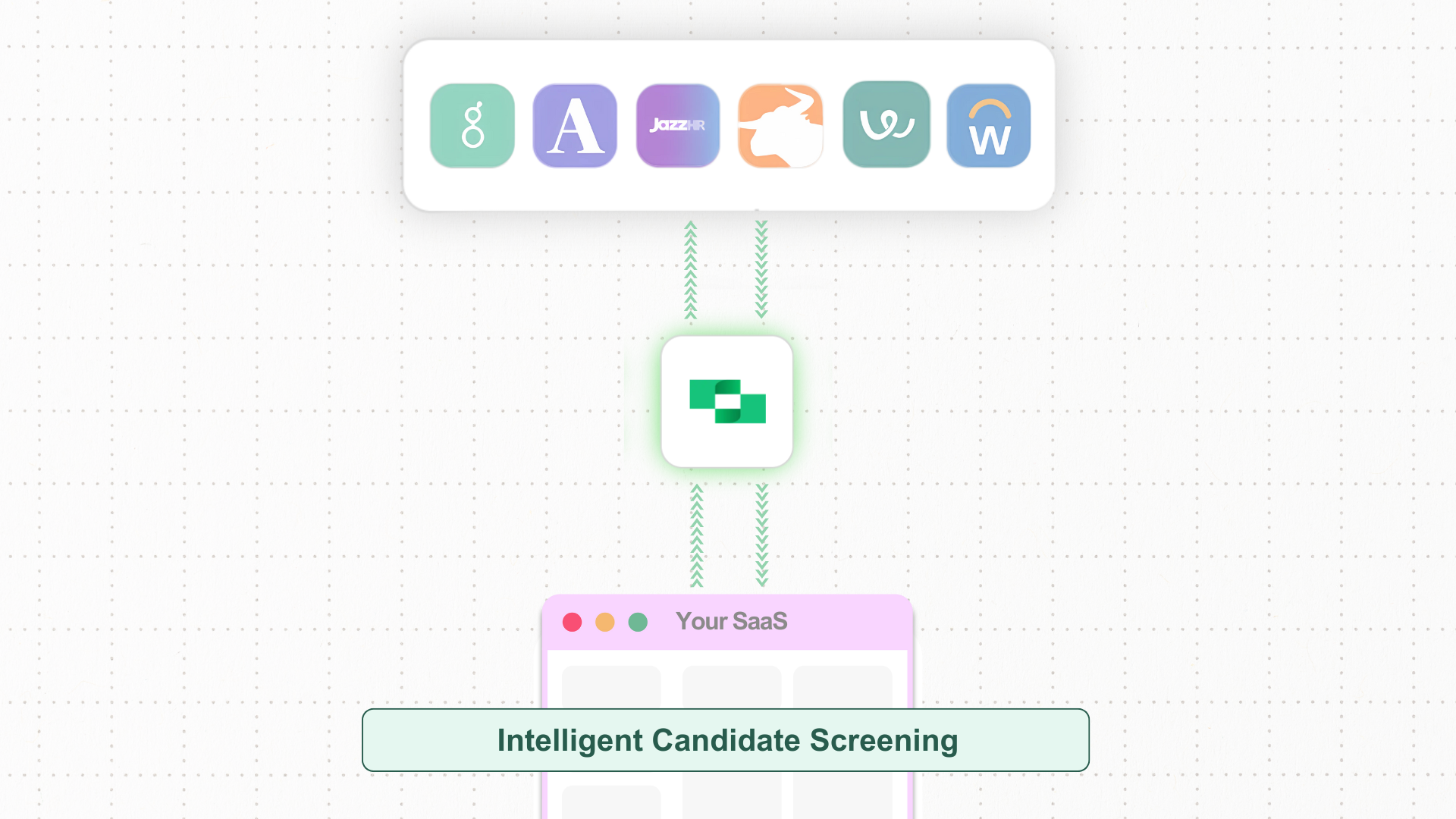 Imagine you’re working on your recruitment SaaS and looking to integrate AI features like application scoring and automated candidate screening. While it may seem simple, syncing data from multiple ATS platforms and handling job postings can bring challenges.
Tracking candidate applications in real-time across different ATS providers can become complicated. It requires proper management to keep everything up to date and consistent, ensuring smooth operation and data accuracy.
* **Unified API** connecting multiple ATS platforms for easy job and candidate data sync.
* **Scalability** that lets you easily add new ATS platforms as your hiring needs grow.
* **Standardized data formats** across ATS platforms for consistent and simplified data management.
* **Real-time updates** via **webhooks**, keeping candidate and application data up to date.
## Automated Candidate Screening with AI: Key Steps and System Interactions
Integrating automated candidate screening into your recruitment SaaS involves syncing data from multiple ATS providers, retrieving job postings, applications, LinkedIn profiles, and resumes, and using AI to score candidates based on job descriptions and criteria set by HR. This allows HR to make quick decisions, such as moving or rejecting candidates.
### Steps for Enabling Automated Candidate Screening in Your SaaS
Below are the steps to enable AI-powered candidate screening in your SaaS, allowing you to sync job postings and applications, score applications, and manage candidate workflows.
**First, fetch active job postings:** Start by pulling all active job postings from the connected ATS provider using `x-account-id` in the request header. This will give you details like `title`, `content`, `locations`, `compensation`, and more.
* **API Endpoint**: [GET /ats/job\_postings](/ats/api-reference/job-postings/list-job-postings)
**Next, pull recent applications:** Fetch all candidate applications updated within the last month by setting the `updated_after` query parameter (e.g., **2024-08-01T00:00:00.000Z**) to ensure your SaaS dashboard has the latest applications.
* **API Endpoint:** [GET /ats/applications](/ats/api-reference/applications/list-applications)
**Retrieve associated candidate data:** For each application, retrieve the associated candidate information, including `name`, `email`, `social_links`, `phone`, and **Resume**. This data will be displayed alongside the application on your SaaS dashboard for easy review and analysis.
* **API Endpoint:** [GET /ats/candidates/\{id}](/ats/api-reference/candidates/get-candidate)
**First, [set up webhooks](../../guides/webhooks) for application updates:** Configure webhooks to automatically sync updates for existing applications, such as `interview_stage`, `rejected_reasons`, and `application_status`, or capture new ones as soon as they are created. Hence, the dashboard always has the most current application data.
* **Webhook Events:** `ats_applications.updated` or `ats_applications.created`
**Next, sync candidate updates:** Similarly, set up webhooks to sync candidate information whenever there are updates or new candidates are added. This keeps your system up to date with the latest candidate details.
* **Webhook Events:** `ats_candidates.updated` or `ats_candidates.created`
**Trigger AI screening system:** Set up a webhook to trigger the intelligence system, which automatically screens and scores applications as they are updated or newly added. This ensures real-time evaluation and decision-making.
**Store fetched data:** Now, store fetched data, such as `application_id`, `candidate_id`, `job_id`, `interview_stage`, `application_status`, `candidate details`, and `resumes` in your database to facilitate real-time screening and analysis.
**Centralize candidate information:** Keeping all data in one place ensures quick access to applications and candidate details for processing and HR decisions.
After applications and candidate details are fetched from the ATS via the recruitment SaaS, they will be screened by an intelligent AI system. The AI will carry out the following operations in the recruitment process:
**Remove bias and fetch profiles:** AI will remove any bias related to gender, race, or culture when evaluating candidates. It will also fetch LinkedIn profiles along with the applications(from the ATS) for a complete analysis.
**Score applications based on criteria:** AI scores each application using criteria set by HR, using NLP to analyze applications against job descriptions.
**Automate actions and emails:** Based on the AI score, the system will automatically or manually move candidates to stages like `Shortlisted`, `Paused`, or `Rejected`, etc, and can send personalized rejection or shortlisted emails to candidates at scale.
* **API Endpoint:** [PATCH ats/applications/\{id}](/ats/api-reference/applications/update-an-application)
**Store scores and analysis:** The AI-generated score, application status, and detailed analysis for each candidate will be stored in the database, ensuring easy access for future reference and reporting.
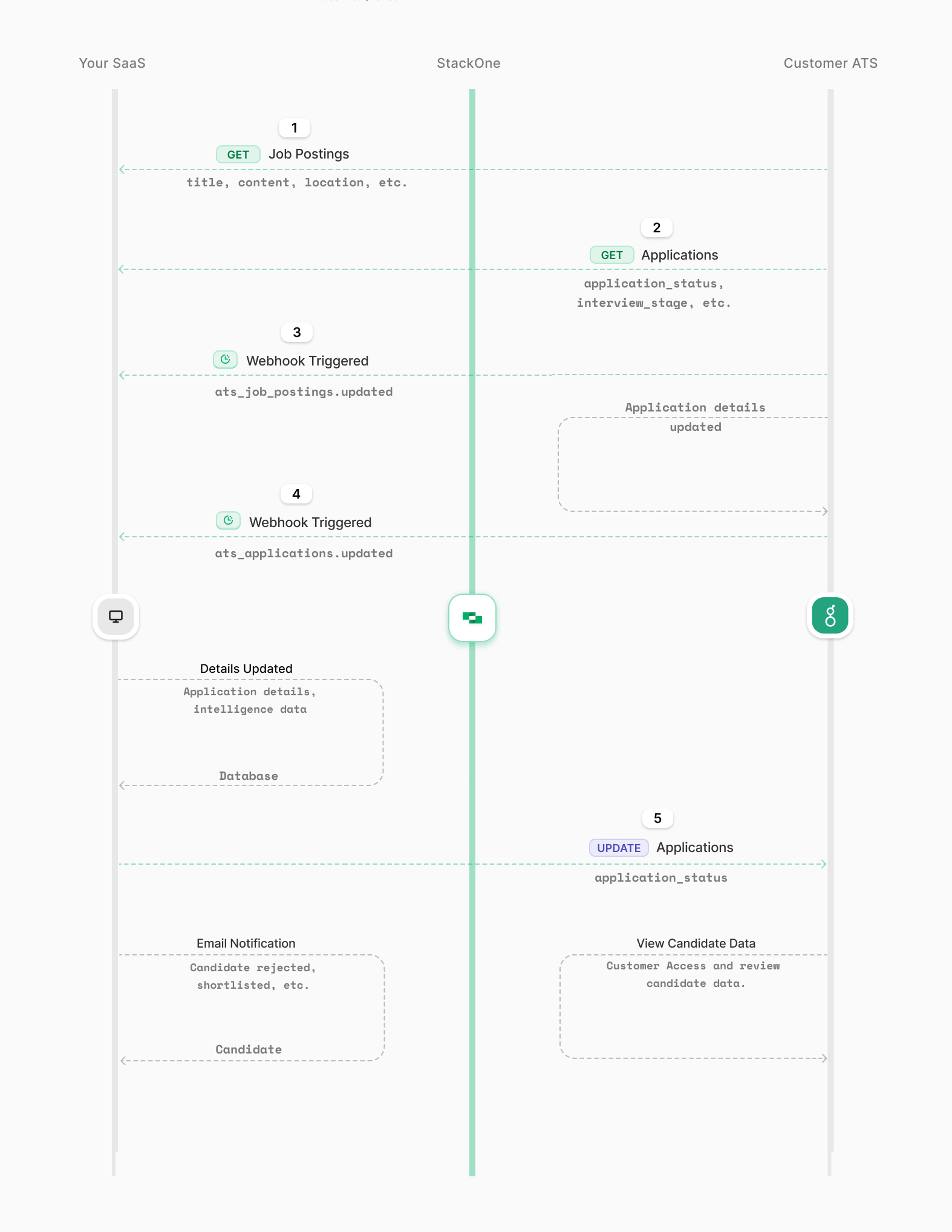
The diagram below shows the key steps, from fetching job postings and applications to storing them in your database, using webhooks for updates, and applying AI-generated data for automated candidate screening and management.
Imagine you’re working on your recruitment SaaS and looking to integrate AI features like application scoring and automated candidate screening. While it may seem simple, syncing data from multiple ATS platforms and handling job postings can bring challenges.
Tracking candidate applications in real-time across different ATS providers can become complicated. It requires proper management to keep everything up to date and consistent, ensuring smooth operation and data accuracy.
* **Unified API** connecting multiple ATS platforms for easy job and candidate data sync.
* **Scalability** that lets you easily add new ATS platforms as your hiring needs grow.
* **Standardized data formats** across ATS platforms for consistent and simplified data management.
* **Real-time updates** via **webhooks**, keeping candidate and application data up to date.
## Automated Candidate Screening with AI: Key Steps and System Interactions
Integrating automated candidate screening into your recruitment SaaS involves syncing data from multiple ATS providers, retrieving job postings, applications, LinkedIn profiles, and resumes, and using AI to score candidates based on job descriptions and criteria set by HR. This allows HR to make quick decisions, such as moving or rejecting candidates.
### Steps for Enabling Automated Candidate Screening in Your SaaS
Below are the steps to enable AI-powered candidate screening in your SaaS, allowing you to sync job postings and applications, score applications, and manage candidate workflows.
**First, fetch active job postings:** Start by pulling all active job postings from the connected ATS provider using `x-account-id` in the request header. This will give you details like `title`, `content`, `locations`, `compensation`, and more.
* **API Endpoint**: [GET /ats/job\_postings](/ats/api-reference/job-postings/list-job-postings)
**Next, pull recent applications:** Fetch all candidate applications updated within the last month by setting the `updated_after` query parameter (e.g., **2024-08-01T00:00:00.000Z**) to ensure your SaaS dashboard has the latest applications.
* **API Endpoint:** [GET /ats/applications](/ats/api-reference/applications/list-applications)
**Retrieve associated candidate data:** For each application, retrieve the associated candidate information, including `name`, `email`, `social_links`, `phone`, and **Resume**. This data will be displayed alongside the application on your SaaS dashboard for easy review and analysis.
* **API Endpoint:** [GET /ats/candidates/\{id}](/ats/api-reference/candidates/get-candidate)
**First, [set up webhooks](../../guides/webhooks) for application updates:** Configure webhooks to automatically sync updates for existing applications, such as `interview_stage`, `rejected_reasons`, and `application_status`, or capture new ones as soon as they are created. Hence, the dashboard always has the most current application data.
* **Webhook Events:** `ats_applications.updated` or `ats_applications.created`
**Next, sync candidate updates:** Similarly, set up webhooks to sync candidate information whenever there are updates or new candidates are added. This keeps your system up to date with the latest candidate details.
* **Webhook Events:** `ats_candidates.updated` or `ats_candidates.created`
**Trigger AI screening system:** Set up a webhook to trigger the intelligence system, which automatically screens and scores applications as they are updated or newly added. This ensures real-time evaluation and decision-making.
**Store fetched data:** Now, store fetched data, such as `application_id`, `candidate_id`, `job_id`, `interview_stage`, `application_status`, `candidate details`, and `resumes` in your database to facilitate real-time screening and analysis.
**Centralize candidate information:** Keeping all data in one place ensures quick access to applications and candidate details for processing and HR decisions.
After applications and candidate details are fetched from the ATS via the recruitment SaaS, they will be screened by an intelligent AI system. The AI will carry out the following operations in the recruitment process:
**Remove bias and fetch profiles:** AI will remove any bias related to gender, race, or culture when evaluating candidates. It will also fetch LinkedIn profiles along with the applications(from the ATS) for a complete analysis.
**Score applications based on criteria:** AI scores each application using criteria set by HR, using NLP to analyze applications against job descriptions.
**Automate actions and emails:** Based on the AI score, the system will automatically or manually move candidates to stages like `Shortlisted`, `Paused`, or `Rejected`, etc, and can send personalized rejection or shortlisted emails to candidates at scale.
* **API Endpoint:** [PATCH ats/applications/\{id}](/ats/api-reference/applications/update-an-application)
**Store scores and analysis:** The AI-generated score, application status, and detailed analysis for each candidate will be stored in the database, ensuring easy access for future reference and reporting.
The diagram below shows the key steps, from fetching job postings and applications to storing them in your database, using webhooks for updates, and applying AI-generated data for automated candidate screening and management.
 ## Conclusion
This walkthrough explained how to add AI-driven resume scoring and automated candidate management to your recruitment SaaS. With StackOne's API and webhooks, you can sync job postings and candidate data across ATS platforms, improving the hiring process. AI Intelligence provides unbiased scoring, automates candidate actions, and stores detailed analysis for future reference, helping HR make quick decisions and improve the hiring process.
## Conclusion
This walkthrough explained how to add AI-driven resume scoring and automated candidate management to your recruitment SaaS. With StackOne's API and webhooks, you can sync job postings and candidate data across ATS platforms, improving the hiring process. AI Intelligence provides unbiased scoring, automates candidate actions, and stores detailed analysis for future reference, helping HR make quick decisions and improve the hiring process.